The employment verification form is the request that arrives in the HR inbox at 4:47pm on a Friday from a mortgage broker who needs the paperwork by Monday. Or from an employee whose visa interview is in nine days. Or from a background-check vendor running a basic confirmation on a candidate you offered a role to last week. Three different requesters, three different formats, all asking the same underlying question: confirm this person works (or worked) for you. The job of a good employment verification form template is to make answering that question a five-minute task instead of a half-hour back-and-forth, and to do it without leaking anything you should not be sharing.
This guide gives you three drop-in templates for the three patterns you will actually meet: a basic verification of employment letter, a salary-included version for mortgage and lease checks, and an employee-requested version for visa and immigration use. All three share the same six-field spine. The variants only add what the specific requester needs. If you want to skip the manual letter writing entirely and let the requester self-serve through a structured form, the Good Form employment verification template handles consent, audit trail, and the response in one go.
The short version:
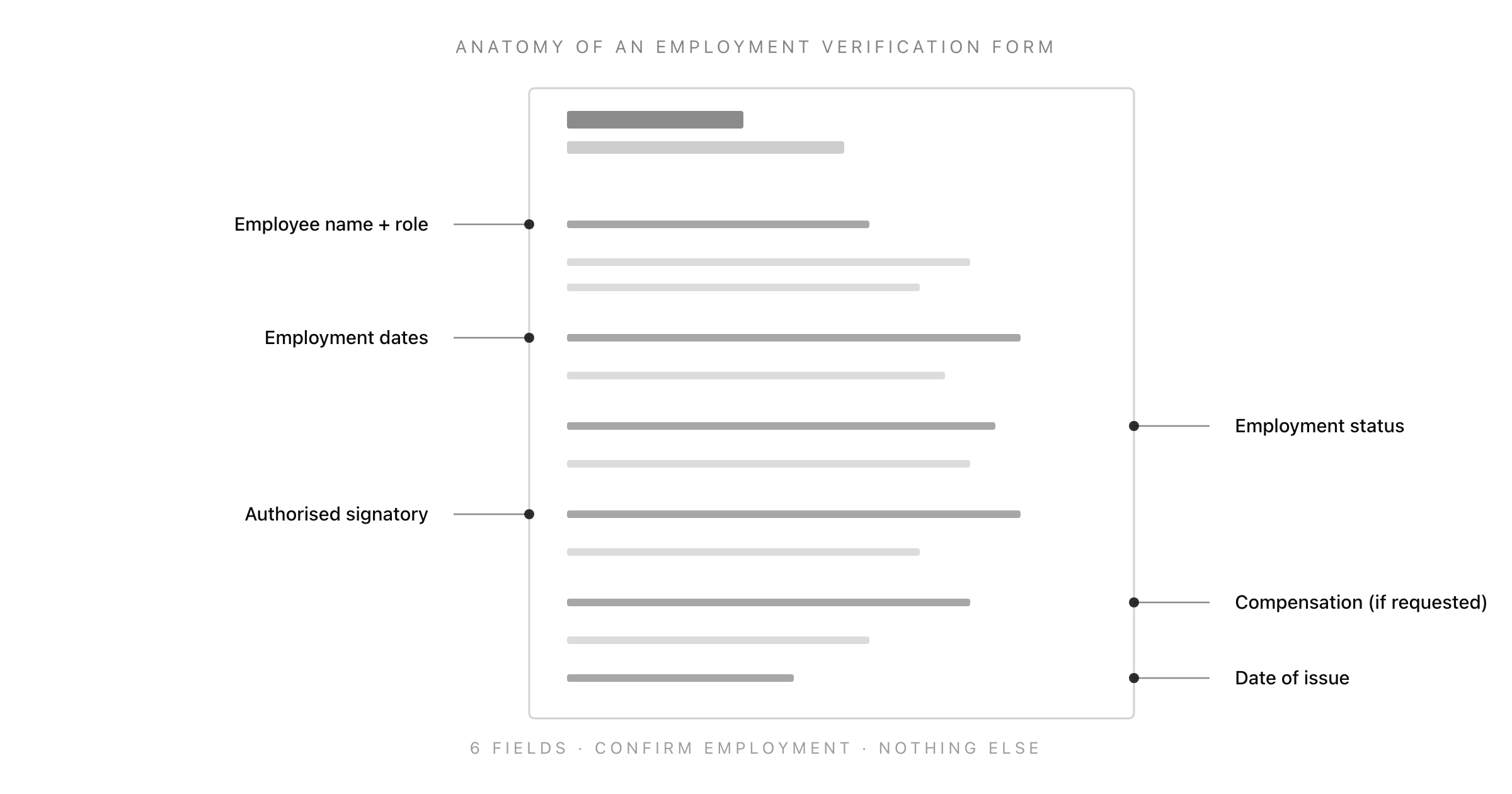
- Every employment verification form needs the same 6 fields. Anything more is variant-specific. Anything less and the requester will email you back asking for what is missing.
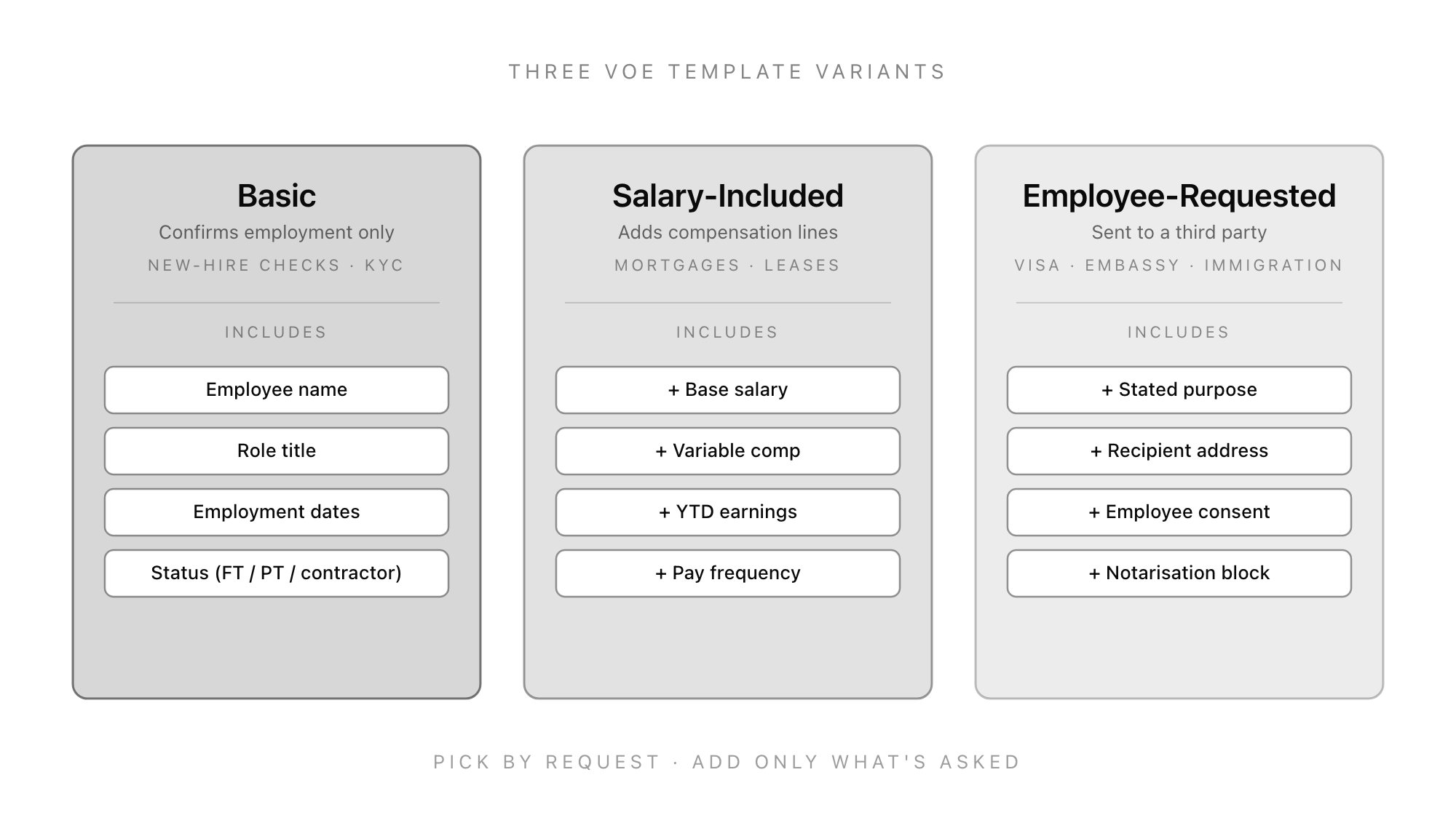
- Three template variants cover 95% of real requests: basic (employment confirmation only), salary-included (for mortgages and leases), and employee-requested (for embassy / immigration / visa work).
- Never share salary, address, or any PII without the employee's written consent. The requester is not your customer. The employee is.
- State the date of issue and a clarifying note that the verification reflects the employee's status as of that date. A verification letter ages, often badly.
- Stop letting requesters draft your reply. Send them a structured Good Form template so the answer is consistent, the consent is captured, and you have an audit trail.
What an Employment Verification Form Actually Is
An employment verification form (often shortened to VOE, for "verification of employment") is a written confirmation from an employer that a named individual works, or has worked, for the employer. It is sent in response to a request from a third party who has a legitimate need to verify the employment, usually because that third party is about to extend credit, sign a lease, issue a visa, or hire the person.
It is not a reference. References are subjective and discuss performance. A verification is factual and deals only with the facts of employment: who, where, when, and (sometimes, with consent) how much.
The reason it gets confused with a reference, and the reason a lot of HR teams over-share when answering one, is that the requesters are often informal about how they ask. A mortgage broker will say "we need a letter confirming employment", and the unstated assumption is "and please include the salary, the start date, the role title, and whether the employee is likely to remain employed". You should answer the parts that are factually true and within scope. You should not answer the speculation about future employment. That is what gets HR teams sued.
When You Actually Need to Send One
Employment verification requests cluster around five life events. Knowing which event you are answering tells you which template to use.
Mortgage applications. A mortgage broker or underwriter is checking the borrower's stated income against the employer's records. They will ask for current employment, salary, year-to-date earnings, and pay frequency. Use the salary-included template. This is the most common request you will see, and the mortgage industry has a standardised form (Form 1005 in the US, varying equivalents elsewhere) that they will often attach.
Tenancy and lease applications. Letting agents and landlords want confirmation of employment and a salary that supports the rent. The salary-included template again. Letting agents are less standardised than mortgage brokers and will sometimes accept a one-paragraph email if it is on company letterhead.
Visa, immigration, and embassy work. The employee is applying for a visa, settled status, a residency permit, or a similar government process. The receiving authority needs proof of employment, sometimes with a stated travel purpose, sometimes with consular notarisation. Use the employee-requested template, because the employee is the one who needs this and has consented to specific information being shared with a specific authority.
Background checks during hiring. A background-check vendor running pre-employment screening on a candidate the new employer just offered. They want confirmation of dates and role title for the previous employment. Use the basic template. They will rarely ask for compensation and you should not volunteer it.
Government benefits and credit applications. Loan applications, credit cards, social-security claims, and similar processes occasionally require a verification of employment letter. These usually include a specific form for you to complete, in which case answer only the fields on the form and resist the urge to add extra context.
If the request does not match one of these five patterns, slow down. Ask the employee to confirm the request and the requester. Phishing attempts that ask for VOEs are a real and growing source of payroll fraud, because once a fraudster has a VOE letter on company letterhead they have one of the documents needed to redirect the employee's pay to a new account.
The 6 Fields Every Employment Verification Form Needs
These six fields appear in every variant. The variants in the next section add to them but never subtract.
1. Employee Name and Role Title
Legal name as it appears in payroll, plus the exact role title the employee currently holds. If they have been promoted, use the current title. If they have left, use the last title they held. Do not use internal seniority bands or job-grade codes that mean nothing to the requester.
2. Employment Dates
A specific start date. For current employees, "from [start date] to present". For former employees, the actual end date. Avoid "since 2024" or "approximately three years"; the requester needs an exact date for their own records, and your payroll system has it.
3. Employment Status
State the employment status in plain language: full-time permanent, part-time permanent, fixed-term contract, casual, contractor. Include hours per week if it is anything other than standard full-time.
4. Authorised Signatory
The name, role, and contact details of the person at the company who is authorised to sign verifications. This should be a single named individual or a small named group, not "HR Team". Banks and underwriters will sometimes call to verify the verification, and if there is no named signatory they cannot complete the call-back.
5. Compensation (Optional, Only When Asked and Consented)
If the request requires compensation and the employee has consented, state base salary as an annual gross figure with the currency and pay frequency. If the request requires year-to-date earnings, include those separately and label them clearly. Variable compensation should be noted as "in addition, the employee is eligible for an annual discretionary bonus" without committing to a figure.
6. Date of Issue
The date the verification letter is being sent. Plus a one-sentence note that the verification reflects the employee's status as of that date. Verifications get used months after they are written. The date is the requester's safeguard, and yours.
Three Drop-In Templates
The three templates below cover roughly 95% of the verification requests an HR team in a small or mid-sized company will see. Each template uses the same 6-field spine. The differences are in what gets added and how the salutation is framed.
Template 1: Basic Verification of Employment
For background-check vendors, KYC requests, new-employer confirmations, and any request that does not require salary information.
[Company letterhead]
[Date]

To Whom It May Concern,

This letter confirms that [Employee Full Name] is currently employed by
[Company Name] as a [Role Title], and has been since [Start Date].

[Employee Full Name] is employed on a [employment status] basis, working
[hours per week] hours per week.

This letter has been issued at the request of a third party. It reflects
[Employee Full Name]'s employment status as of [Date of Issue]. Please
contact the undersigned at [phone / email] to verify this letter.

Sincerely,

[Authorised Signatory Name]
[Role]
[Direct contact]
Template 2: Salary-Included Verification of Employment
For mortgage brokers, underwriters, letting agents, and landlords. Only use this template when the employee has consented to compensation being shared, ideally in writing.
[Company letterhead]
[Date]

To Whom It May Concern,

This letter confirms that [Employee Full Name] is currently employed by
[Company Name] as a [Role Title], and has been since [Start Date].

[Employee Full Name] is employed on a [employment status] basis, working
[hours per week] hours per week.

[Employee Full Name]'s current annual base salary is [Currency Amount],
paid [pay frequency]. Year-to-date gross earnings as of [Date of Issue]
are [Currency Amount]. In addition, [Employee Full Name] is eligible for
[describe variable compensation in general terms, no committed figure].

This letter has been issued at the written request of [Employee Full Name]
for the purpose of [stated purpose, e.g. mortgage application]. It reflects
[Employee Full Name]'s employment status as of [Date of Issue]. Please
contact the undersigned at [phone / email] to verify this letter.

Sincerely,

[Authorised Signatory Name]
[Role]
[Direct contact]
Template 3: Employee-Requested Verification (Visa / Immigration)
For embassies, consulates, immigration authorities, and any visa application. The defining feature is that the employee has explicitly initiated the request and the receiving authority and purpose are named.
[Company letterhead]
[Date]

To: [Receiving Authority Full Name and Address]
Re: Employment Verification for [Employee Full Name], Passport [Number]

Dear [Receiving Authority],

This letter confirms that [Employee Full Name] is currently employed by
[Company Name] as a [Role Title], and has been employed since [Start Date].

[Employee Full Name] is employed on a [employment status] basis, working
[hours per week] hours per week. Their current annual base salary is
[Currency Amount].

This letter is issued at the written request of [Employee Full Name] in
support of their application for [stated purpose, e.g. tourist visa to
visit Italy from 12 May 2026 to 26 May 2026]. [Company Name] confirms that
[Employee Full Name]'s employment is expected to continue beyond the dates
of the proposed travel, and that [Employee Full Name] is granted leave of
absence for the period stated.

Should you require any further information, please contact the undersigned
at [phone / email].

Sincerely,

[Authorised Signatory Name]
[Role]
[Direct contact]

[Notarisation block, if required by the receiving authority]
Stopping the Friday-Afternoon Bottleneck
The reason employment verification requests always feel urgent is that the requester has been chasing the employee for the document, the employee has been chasing you, and by the time it arrives in the HR inbox the deadline is hours away. The fix is structural, not a matter of being faster at writing letters.
Two changes solve roughly 90% of the urgency:
1. Publish the request channel. Put a single intake URL on the company intranet that any employee can share with the requester. The intake form collects the requester name, the requester contact, the purpose, the type of verification needed, and the employee's signed consent for any compensation disclosure. The form lands in HR with everything you need to respond in one pass, instead of three.
2. Pre-populate the templates. The three templates above are static. Most fields are auto-populatable from your HRIS (name, role, dates, salary, signatory). The only thing the HR person should be writing is the stated purpose and the date of issue. If you find your team rewriting the same paragraphs, automate the populating layer.
Most HRIS platforms will generate a basic VOE on demand. If yours does not, or if you need a structured intake before the letter is produced, Good Form's employment verification flow handles intake, consent capture, and templated response generation in one place. The template populates from your fields. The audit trail is automatic.
What You Can and Cannot Share
The legal floor varies by jurisdiction, but the practical floor for employment verification is the same everywhere: share only what the requester is entitled to, only with the employee's consent, and only when the requester is who they say they are.
Always safe to share without specific consent: confirmation of employment, role title, employment dates, employment status. These are facts about the employment that the employee has implicitly agreed to be verifiable when they sought third-party services that need verification.
Only with explicit written consent: salary, year-to-date earnings, variable compensation, address on file, bank details, performance information, reason for leaving. Treat these as opt-in for every single request. A blanket "we share salary information when asked" policy fails GDPR's lawful basis test and most equivalent regimes.
Never share, even with consent: medical information, disciplinary history, performance reviews, the contents of personnel files, anything that is not directly responsive to the question the requester asked. If they did not ask, you do not volunteer it.
Verify the requester before you reply. Reply-to-address spoofing is the entry point for payroll redirection fraud. If the request arrives by email, call the requester back at a number you found independently (the bank's main switchboard, the letting agent's company page, the embassy's consular line) before sending the verification. Five minutes of friction beats six months of investigating where the salary went.
Closing: Make This Five Minutes, Not Thirty
The mistake most HR teams make with employment verification forms is treating each request as bespoke. The requests are not bespoke. There are three patterns, six fields, and a small number of consent and verification questions. Pick the right template, populate the fields, send.
If you want to compress this even further and remove the bottleneck entirely, Good Form's employment verification template lets the requester complete a structured intake form. The form collects everything you need to issue the letter, captures the employee's consent for any compensation disclosure, and produces the populated template ready for your signature. The first verification you process this way takes ten minutes to set up. Every subsequent one takes the time it takes to read the intake and click send. Pair that with the other HR forms in the Good Form library (application, onboarding, performance review, exit interview) and the entire HR-form surface area runs through one consistent intake layer.
Three templates, one spine, one signed letter. That is the entire job.