A well-designed interview feedback form is the difference between a hiring decision that feels defensible at 6 p.m. on a Friday and one that feels like a group text debate that never quite lands. Most teams write feedback in Slack threads, ad-hoc emails, or whatever notes app is open. The result is inconsistent detail, bias that goes unchecked, and a record that won't hold up if a rejected candidate ever pushes back on the decision. This guide is the one we wish we'd had when we first started running interview loops for our customers.
We'll cover what actually belongs on an interview feedback form, why structured scoring outperforms "just write a paragraph", the compliance-minded reasons to keep the record tidy, the exact fields for a template that works for 80% of roles, role-specific variations, common mistakes, and a ready-to-clone Good Form template you can deploy to your hiring team in under five minutes.
The short version:
- Every interviewer fills the same form. No exceptions. Consistency is the whole point.
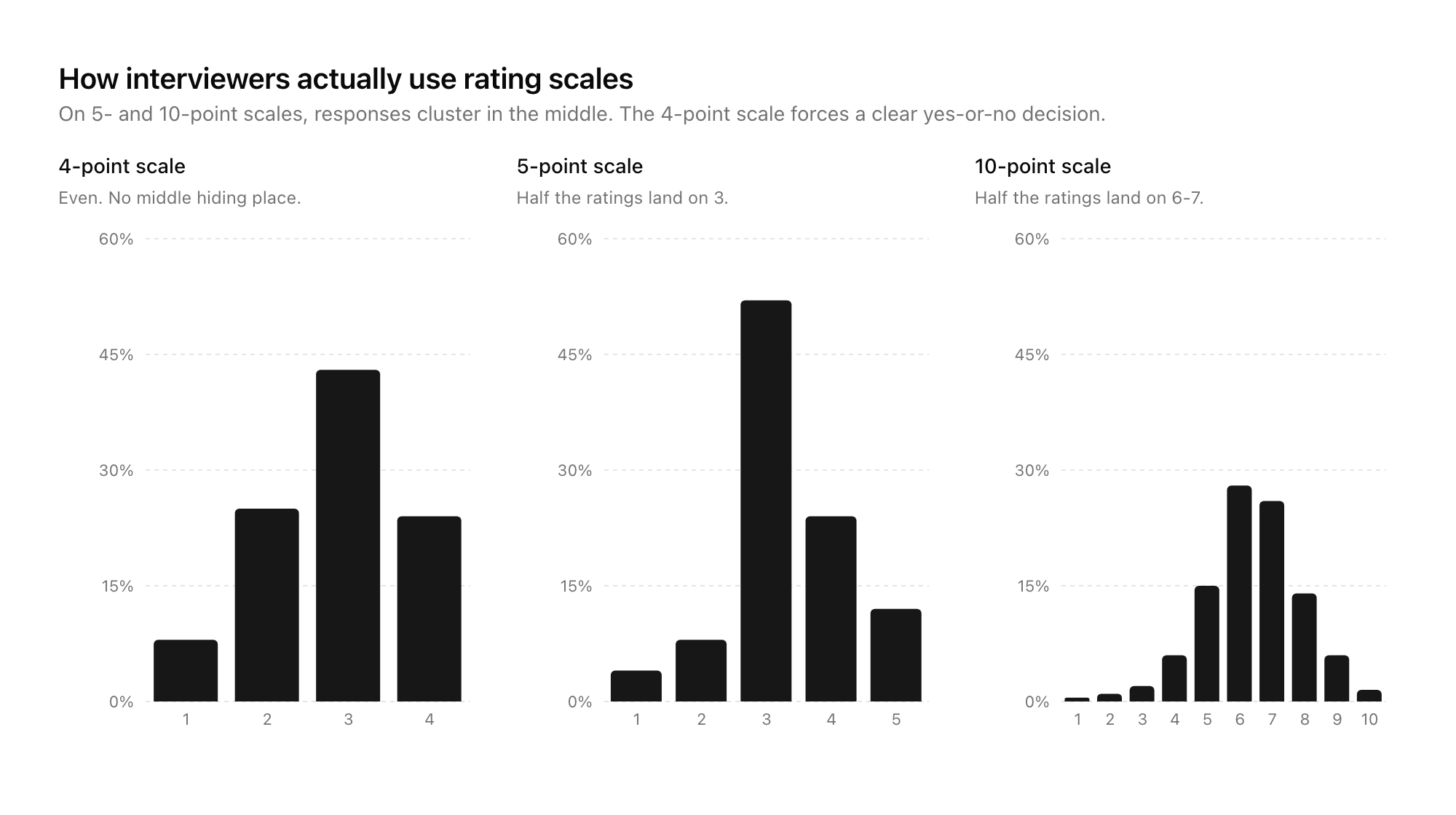
- Score on 3–5 predefined criteria with a 1–4 scale. Skip the 10-point scale (nobody uses 3).
- Capture specific evidence for each score, not just the number.
- Hide other interviewers' scores until yours is submitted (prevents anchoring).
- Clone the Good Form template → and run your next loop on it.
Why an Interview Feedback Form Actually Matters
Hiring decisions made without a structured feedback form tend to fail in three predictable ways.
Ask-bias. Every interviewer probes different things. One asks about SQL, another about conflict resolution, a third about leadership. You end up comparing signals that don't line up. A structured feedback form forces the loop to agree upfront on what's being evaluated.
Recency-bias. Without a written scorecard, the last candidate seen is always "the best." Our brains compress old interviews into vague impressions while keeping the recent one vivid. A feedback form locked in at time of interview preserves the real signal.
Anchoring. If interviewer A says "this candidate was incredible" in the debrief Slack thread, interviewer B's objective assessment quietly drifts toward agreement. A form completed individually before any discussion cuts this almost entirely.
Beyond the quality argument, there's a compliance one: if a rejected candidate ever contests the decision (unsuccessful internal transfer, protected-class claim, awkward reference check), a complete, timestamped feedback record with specific evidence is the defensible answer. A Slack thread is not.
What Actually Belongs on an Interview Feedback Form
Strip a feedback form back to essentials and there are six sections every one needs, regardless of role.
| Section | Purpose |
|---|---|
| Interview metadata | Who, when, which stage, which role, how long |
| Overall recommendation | A single clear signal: Strong Yes / Yes / No / Strong No |
| Competency scores | 3–5 predefined criteria, scored 1–4 each, with evidence |
| Specific evidence | Quotes, examples, moments that justify the scores |
| Concerns | Anything that worried you. Use this box or forget it happened. |
| Optional: one-word summary | A snap-judgment field. Surprisingly useful on close calls. |
Anything outside those six is noise. If your current feedback form has ten criteria, a "culture fit" score, a dropdown for "coachability", and a free-text field labelled "additional thoughts", you've built something that takes interviewers 25 minutes to fill out and still won't produce a better decision.
The 4-Point Scale, Not 10
There's good research on rating scales that says odd-numbered scales (1–5, 1–7) let people pick the middle and avoid committing. Even-numbered forces a choice. Use a 4-point scale: Strong No / No / Yes / Strong Yes. For competency scores, the same shape works: 1 = "well below bar", 2 = "below bar", 3 = "at bar", 4 = "above bar".
Why not 10? Because on a 10-scale, interviewers cluster everything into 6–8. You lose all the resolution in the middle band where decisions actually happen.
Structured Scoring vs Free-Text: What the Evidence Says
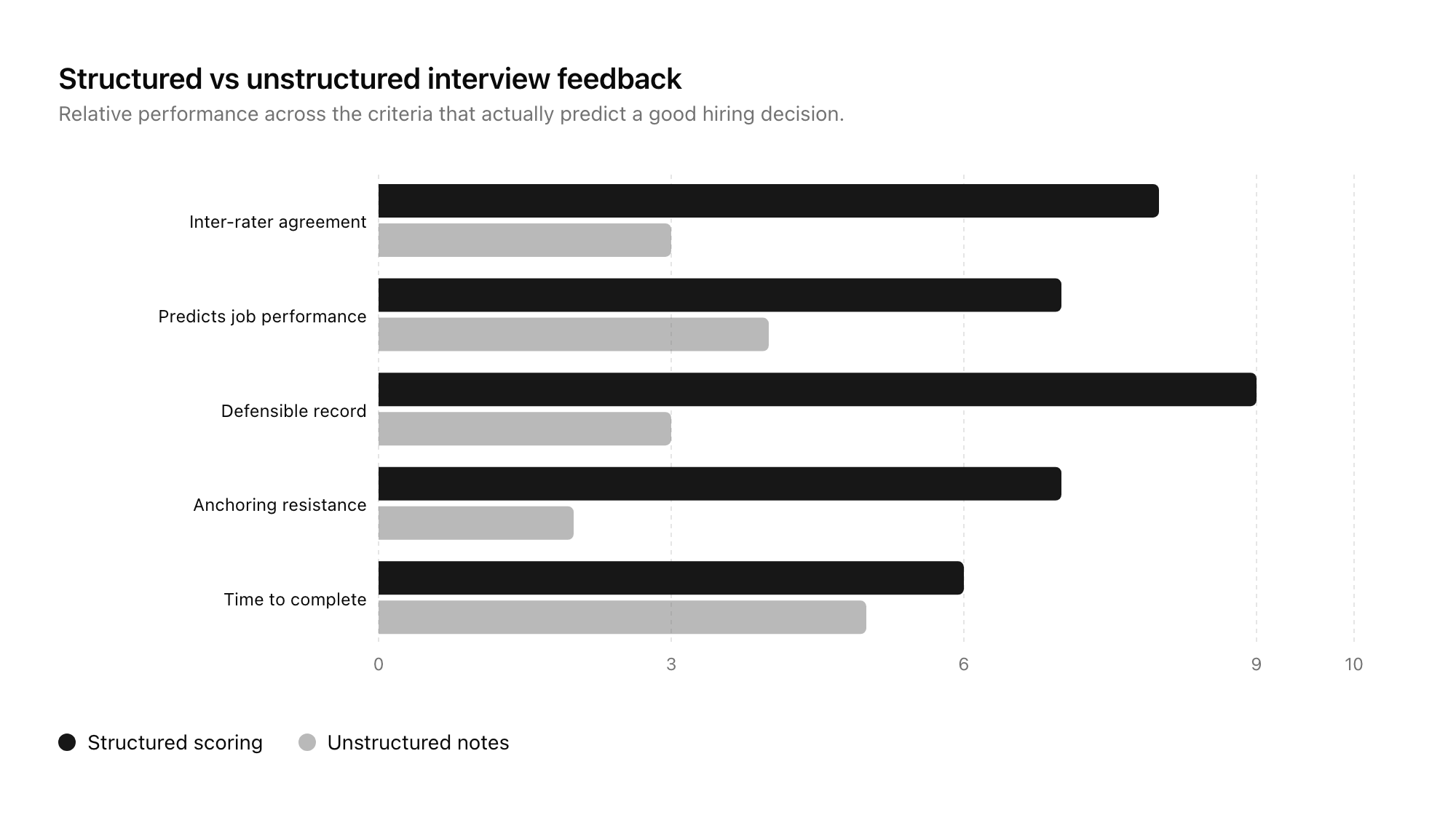
The case for structured over free-text isn't a style preference. Google's Project Oxygen and countless industrial-organisational psychology studies have shown that structured scoring on predefined criteria consistently predicts job performance better than unstructured interviews with free-form notes. The same pattern holds for the feedback stage: when interviewers score against a fixed rubric, the hiring team agrees with one another more often and bad hires drop.
Free-text has its place. A one-paragraph "specific evidence" box sits alongside each competency score in a good form. But the decision-grade signal lives in the numbers and the overall recommendation, not in the prose.
The tension some hiring managers feel with structured scoring is that it feels mechanical. "I can tell in five minutes if someone's right for this role." You might be right. You're also probably anchoring on pattern-matching that smuggles in bias. The form isn't there to second-guess your judgement. It's there to make sure the record supports whatever judgement you actually reach.
An Interview Scorecard Template That Works for 80% of Roles
This is the base template. Role-specific variants in the next section.
INTERVIEWER: [name]
CANDIDATE: [name]
ROLE: [role title]
INTERVIEW STAGE: [screen / technical / onsite / culture / final]
DATE: [YYYY-MM-DD]
DURATION: [e.g. 45 min]

OVERALL RECOMMENDATION  (required)
○ Strong Yes   ○ Yes   ○ No   ○ Strong No

COMPETENCY SCORES  (1 = well below bar, 2 = below bar, 3 = at bar, 4 = above bar)

1. [COMPETENCY 1, e.g. "Role-specific technical skill"]
   Score: [1–4]
   Evidence: [what specifically justifies this score]

2. [COMPETENCY 2, e.g. "Communication"]
   Score: [1–4]
   Evidence: [what specifically justifies this score]

3. [COMPETENCY 3, e.g. "Problem-solving approach"]
   Score: [1–4]
   Evidence: [what specifically justifies this score]

4. [COMPETENCY 4, e.g. "Ownership / initiative"]
   Score: [1–4]
   Evidence: [what specifically justifies this score]

CONCERNS
[Anything that worried you. Be specific.]

ONE-WORD SUMMARY  (optional)
[A single word that captures the candidate for you.]
That's it. Five sections, scored on a 4-point scale, with evidence. Fills in under 10 minutes if the interviewer writes it right after the conversation.
Role-Specific Variants
The four competencies shift per role. Pick three to five that matter for the work, lock them at the start of the loop, and use the same set for every candidate.
Engineering
- Technical depth in [language / domain]
- System design / problem-solving approach
- Communication of technical reasoning
- Ownership and debugging instinct
Sales
- Discovery and qualification skill
- Objection handling
- Pipeline management / organisation
- Narrative and executive-presence
Product / Design
- Craft and critique ability
- User-centred reasoning
- Cross-functional communication
- Prioritisation and tradeoffs
Operations / Support
- Process thinking and instinct for systems
- Written communication
- Empathy and de-escalation
- Follow-through
Senior / Leadership
- Strategic reasoning
- People and coaching instinct
- Stakeholder management
- Judgement under ambiguity
In every case, four competencies is the sweet spot. Three is fine for a short interview. Five starts to be too much. Six or more means you've confused "the things the job needs" with "a list of everything I can think of".
How to Run the Feedback Loop
The form is half of it. The other half is the ritual around it.
- Lock the rubric before the first interview. The hiring manager defines the four competencies and writes one sentence per competency explaining what "at bar" looks like. Every interviewer gets this. No ad-hoc additions mid-loop.
- Every interviewer fills the form within 24 hours of the interview. Ideally the same day, ideally the same hour. Memory decays fast.
- No one sees anyone else's scores until they've submitted their own. This is the single highest-leverage rule. Anchoring is almost entirely a pre-debrief problem. A good form builder can lock this down at the platform level.
- Debrief meetings open with scores visible. The hiring manager shares the aggregate view, then the discussion starts from the disagreements. Don't start with "so, what did everyone think?"
- Archive every form. Even the rejected candidates. Especially the rejected candidates. Six months later when a dispute arises or when you're refining the rubric, you want the record.
A good interview feedback form supports all five of those points if the underlying form platform does. Most generic form builders don't. Good Form does, and so do the purpose-built ATS tools.
Common Mistakes
Patterns we see on broken feedback forms:
- Too many competencies. Ten sliders is not better than four. It's worse. Interviewers game the middle.
- "Culture fit" as a single score. Vague. Either bake specific cultural behaviours into your competencies, or don't score it.
- 5-point or 10-point scales. Force a decision with 4-point.
- Optional fields everywhere. If evidence and overall recommendation aren't required, they won't be filled.
- One big free-text box instead of scores. This is just unstructured notes in a Google Form wrapper. It doesn't solve the problem.
- Filling the form during the interview. Obvious, distracting to the candidate, hurts the conversation. Fill it right after.
- Not hiding other interviewers' scores until yours is in. Anchoring kills your loop.
Why Google Forms (and the Default Options) Fall Short Here
The standard objection is "we can just use Google Forms / JotForm / Typeform." In principle, yes. In practice, here's what breaks.
- No way to hide the results from a given respondent until they've submitted. Other interviewers' scores leak.
- Weak pipeline view. You get a spreadsheet of submissions, not a by-candidate rollup.
- Hard to share the aggregate scorecard during a debrief without re-exporting or copying.
- No easy way to lock a role-specific template and reuse it across candidates without manual copying.
- Audit trail is thin if you ever need to defend a decision.
Good Form was built for this pattern. You can clone the interview feedback template in Good Form and have your hiring team filling it out by their next loop. It handles the hide-until-submitted piece, a candidate-by-candidate rollup, and a clean export for archives.
Frequently Asked Questions
What's the difference between an interview feedback form and an interview scorecard?
Almost none. "Scorecard" tends to imply more emphasis on the numbers and less on the evidence narrative. "Feedback form" is the broader umbrella. A good one is both: structured scores plus specific evidence. The search phrase you use doesn't matter; the structure does.
How long should a feedback form for an interview take to complete?
Well-designed, around 10 minutes. Shorter than that and you're not capturing enough evidence. Longer and you've added too many competencies or too many fields. 10 minutes × 4 interviews = 40 minutes per loop member per candidate. That's the right budget.
Should candidates ever see their interview feedback?
Only in aggregate and only on request. Never share interviewer-attributed scores with candidates. If you do share anything, share the hiring team's overall recommendation and a couple of concrete areas for growth. Be careful with jurisdictions that have right-to-access laws; work with your people team.
Can we use the same interview feedback form across all roles?
The shell of the form, yes. The competencies, no. Lock the four competencies per role at the start of the loop. The mechanics (4-point scale, evidence per score, overall recommendation, concerns) stay consistent.
What if interviewers don't fill out the form?
They will if you make it a prerequisite for debrief and the form takes 10 minutes. They won't if it takes 30 minutes or if the debrief happens regardless. This is an operational problem more than a form-design one. A form with a clear, tight rubric is easier to complete than a vague one.
Ship Your Interview Feedback Form Today
We've built an interview feedback form template in Good Form that implements everything above: a 4-point scale, competency-by-competency evidence prompts, hide-until-submitted logic so one interviewer can't anchor another, and a clean per-candidate rollup for the hiring manager. It works on desktop, it works on a phone between interviews, and it's ready to clone and customise to your rubric.
Clone the interview feedback form in Good Form →
If you're redesigning your whole hiring funnel and not just the feedback step, pair this with the candidate-facing application form template and the guide on reducing time to hire with better application forms. Together they're three of the four forms every hiring workflow needs. The fourth, offer acceptance, is a topic for another post.