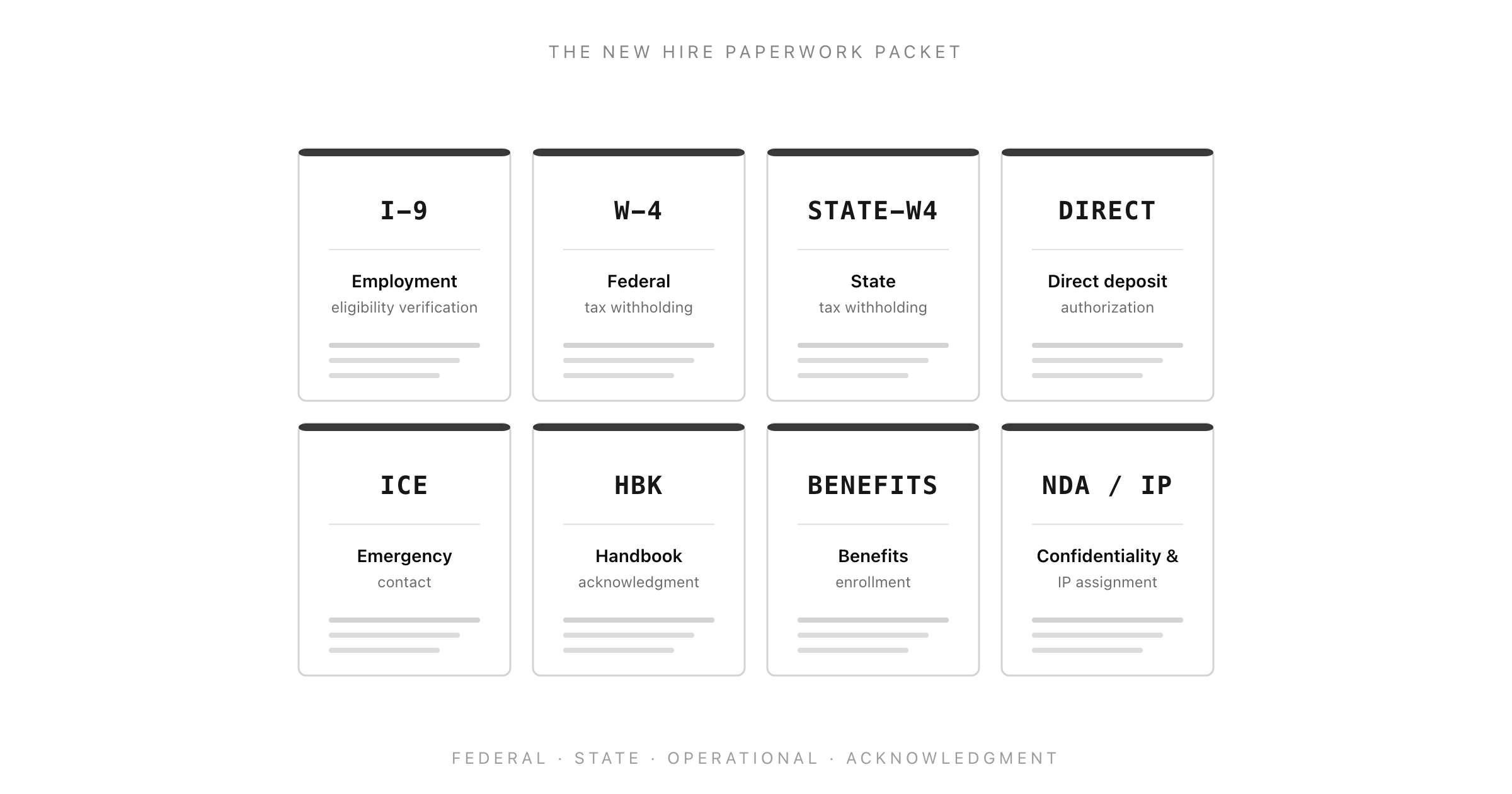
New hire paperwork is not one document. It is a packet of roughly eight to ten forms that have to be sent, signed, and filed in the right order, with at least three legally binding clocks running underneath them, and the difference between a clean personnel file and an audit finding usually comes down to whether the I-9 was completed by the third business day, whether the state new-hire report went out within twenty days, and whether the benefits enrollment window was opened on time. Most small HR teams discover the clocks the hard way, two months in, when an employee asks why they were not enrolled in the medical plan and the team realises the thirty-day window closed before anyone sent the enrollment forms.
This guide is the complete new hire paperwork packet for a US employer with a small HR function. It walks through the federal forms (I-9, W-4), the state forms, the operational forms (direct deposit, emergency contact, benefits enrollment), and the acknowledgment forms (handbook, NDA, IP assignment), explains the deadline rules that govern each one, and ends with a printable day-one checklist. The audience is the HR team of one, the office manager wearing the HR hat, the operations lead who just made their first hire and has a startle reflex about the I-9. If you want to capture the non-federal information cleanly in one form your new hires can submit before day one, clone the Good Form new hire information template.
The short version:
- The new hire paperwork packet has four layers: federal forms (I-9, W-4), state forms (state withholding plus the new-hire report HR files with the state directory), operational forms (direct deposit, emergency contact, benefits enrollment, equipment), and acknowledgment forms (handbook, NDA, IP assignment, at-will). All four layers run in parallel.
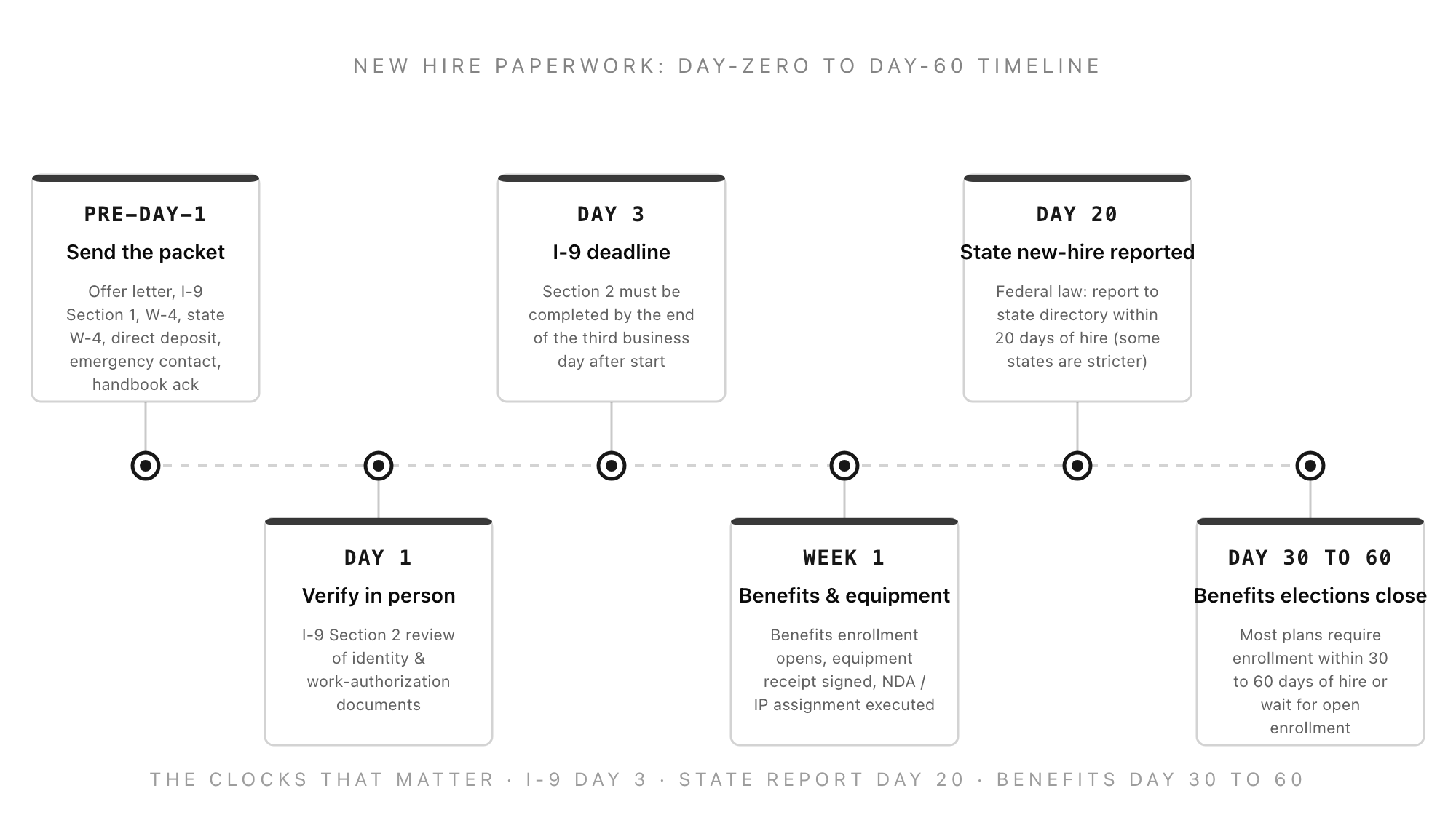
- The clocks: I-9 Section 1 by the first day of employment, Section 2 by the end of the third business day after the start date. State new-hire report within twenty days of hire (some states require ten or seven). Benefits enrollment within thirty to sixty days of hire (plan-specific, but the window is in writing). W-4 collected by the first paycheck or default to single with no adjustments.
- The federal forms have authoritative versions you must use as printed. Do not build your own I-9 or W-4. Download from uscis.gov and irs.gov and use the current edition. Self-built versions are a compliance risk and an audit liability.
- The non-federal forms are the ones HR can actually design. Direct deposit, emergency contact, equipment receipt, NDA / IP assignment, handbook acknowledgment, and the new hire information form. These are the ones a form builder makes faster, not the federal ones.
- State new-hire reporting is the requirement most small employers do not know exists. Federal law requires every employer to report every new hire to the state's new-hire directory within twenty days, and many states are stricter. The penalty is per-employee per-incident and accumulates fast.
- Clone the Good Form new hire information template for the layer of the packet HR actually owns: legal name, address, emergency contact, pronouns, equipment shipping address, t-shirt size, dietary requirements for orientation, anything else the federal forms do not capture. Send it before day one and the day-one paperwork session is half as long.
What "New Hire Paperwork" Actually Includes
The phrase covers every form that has to be signed, collected, or filed when an employee starts. It is useful to think of the packet in four layers, because the layers have different owners, different deadlines, and different rules about whether HR can build its own version.
Layer 1: Federal forms. The I-9 (Department of Homeland Security, USCIS) and the W-4 (Internal Revenue Service). These are non-negotiable, prescribed federal forms. HR sends the version published by the agency and uses the current edition. Self-built versions are a compliance risk; the I-9 in particular is audited by ICE and a non-conforming form is treated as if no I-9 was completed at all. Download the current I-9 from uscis.gov/i-9 and the current W-4 from irs.gov/forms-pubs/about-form-w-4.
Layer 2: State forms. Most states with a state income tax have a state W-4 equivalent (CA DE-4, NY IT-2104, MA M-4, etc.) that controls state withholding. The state filing also includes the new-hire report, which HR (not the employee) files with the state's new-hire directory within twenty days of hire. Nine states have no state income tax (Alaska, Florida, Nevada, New Hampshire, South Dakota, Tennessee, Texas, Washington, Wyoming) and skip the state W-4, but the new-hire report is federal law and applies in every state.
Layer 3: Operational forms. Direct deposit authorization, emergency contact, benefits enrollment, equipment receipt, the new hire information form. These are the forms HR designs to capture the information the federal forms do not collect. They are also the forms that benefit most from being on a form builder rather than a PDF, because they get filled out remotely before day one and the data flows straight into the systems that need it.
Layer 4: Acknowledgment forms. Employee handbook acknowledgment, at-will employment acknowledgment, code of conduct, NDA and IP assignment, harassment / EEO policy acknowledgment, electronic communications policy. The point of these is the signature, not the data. A signed acknowledgment is the evidence that the policy was distributed; without it, a later disciplinary action that relies on a policy is harder to defend.
The Federal Layer: I-9 and W-4
Form I-9 (Employment Eligibility Verification)
The I-9 verifies that a new hire is authorized to work in the United States. It has three sections. Section 1 is the employee's attestation of identity and work authorization, completed by the employee on or before the first day of employment. Section 2 is the employer's review of identity and work-authorization documents, completed by an employer representative by the end of the third business day after the start date. Section 3 is for reverification (used later, not at hire).
The Section 2 deadline is the one that quietly fails. "Third business day" means the start date counts as day one, so a Monday start has a Wednesday end-of-day deadline. The employee presents one document from List A (which establishes both identity and work authorization, e.g. US passport, permanent resident card) or one document from List B (identity, e.g. driver's license) and one from List C (work authorization, e.g. social security card, certified birth certificate). HR examines the originals (not photocopies, with limited remote-verification exceptions for E-Verify employers participating in the Alternative Procedure), records the document title, issuing authority, document number, and expiration, and signs the attestation.
The single most common I-9 error is over-documentation: asking for both List B and List C when the employee has presented a List A document, or asking for specific documents instead of letting the employee choose from the lists. Both are forms of document abuse and are independently actionable under the Immigration and Nationality Act. The rule is that the employee picks; HR examines what is presented; HR cannot demand a specific document.
Retain the I-9 for the longer of three years after hire or one year after termination. Store I-9s separately from the personnel file (a dedicated I-9 binder or a separate digital folder) so they can be produced for an ICE audit without exposing the rest of the personnel file.
Form W-4 (Employee's Withholding Certificate)
The W-4 tells the employer how much federal income tax to withhold from the employee's pay. The 2020 redesign removed allowances and replaced them with a five-step structure: filing status, multiple-jobs adjustment, dependents, other adjustments (other income, deductions, extra withholding), and signature. The 2026 edition is similar.
If the employee does not return a W-4, the employer must withhold as if the employee is single with no adjustments, which is the highest-withholding default. Tell the employee that, because the default is rarely what they want. Employees can submit a new W-4 at any time, and the employer must implement it no later than the first payroll period ending on or after the thirtieth day from the date the new W-4 was received.
State W-4 forms follow the same logic but vary in structure. Some states (CA, NY, MA, NJ, IL) have their own multi-step form; others (CO, ND) accept the federal W-4 as the state W-4 by default. Confirm the state's current form by checking the state department of revenue website at the start of each tax year.
The State Layer: New-Hire Reporting
Federal law (the Personal Responsibility and Work Opportunity Reconciliation Act of 1996) requires every employer to report every newly hired or rehired employee to the designated state new-hire directory within twenty days of the date of hire. The directory feeds into the federal Office of Child Support Enforcement, which uses it to enforce child-support orders.
The reporting elements are the employer's federal employer identification number, the employer's name and address, and the employee's name, address, social security number, and date of hire. Most states accept the W-4 itself as a valid new-hire report, which is convenient if the W-4 is filed promptly. Some states require the report electronically through a state portal (TX Workforce Commission, CA EDD, NY DTF) or by fax for paper-only employers.
A few states are stricter than the twenty-day federal floor. Iowa requires fifteen days; some states require seven days for electronic filers. The state's reporting page lists the rule. The penalties for non-reporting are small per incident (typically $25 to $200 per missed report) but accumulate per employee per incident, so a year of missed reports across ten new hires can compound into a multi-thousand-dollar finding.
The form HR files is short. It is also the form most likely to be forgotten in a small HR team because the employee never sees it and there is no internal customer asking when it gets done. Build it into the post-W-4 step of the day-one workflow so it cannot be skipped.
The Operational Layer: Direct Deposit, Emergency Contact, Benefits, Equipment
This is the layer where the form builder earns its keep. Federal forms have to be the federal forms. State forms have to be the state forms. Acknowledgments are signature collection. The operational layer is HR's own design, and it is where most of the new-hire information actually lives.
Direct deposit authorization. Routing number, account number, account type (checking or savings), authorized amount or split, signature, and a voided check or bank letter as verification. Most payroll providers accept a simple form; some (ADP, Gusto) have a deeper integration that pulls the data straight into payroll. The form is the gatekeeper before the first paycheck. Have it filled out before day one. The Good Form direct deposit form template is built for this exact intake.
Emergency contact. Two contacts, name, relationship, phone, optional email. This one is genuinely important the first time it gets used (a workplace incident, an out-of-hours emergency) and is otherwise inert. Update it annually as part of the personnel-file refresh.
Benefits enrollment. Medical, dental, vision, FSA / HSA, 401(k), life and AD&D, voluntary lines. Most plans have a thirty-day enrollment window from hire (some are sixty); the window is plan-specific and is in the summary plan description. Miss the window and the employee waits until the next open enrollment, which is a costly mistake the employee will hold against HR for as long as it takes for the next open enrollment to arrive. The 401(k) auto-enrollment rules under SECURE 2.0 changed this for plans established after December 29, 2022, which now require automatic enrollment at 3 to 10 percent unless the employee opts out within a specific window.
Equipment receipt. Laptop model, serial number, charger, monitor, peripherals, condition at issuance, employee signature. The point is to establish that the equipment was issued in working order so a return-condition dispute is settleable. Bundle this with the equipment shipping address (which is captured pre-day-one if equipment is shipped to remote employees).
The "new hire information" form. Legal name, preferred name, pronouns, home address, mailing address, phone, personal email, emergency contact (covered above), date of birth (only if needed for benefits), shirt size (for swag), dietary restrictions (for orientation lunch). This is the form that asks for everything the federal forms do not. Send it before day one, get it back before day one, and the day-one onboarding session is half as long.
The Acknowledgment Layer: Handbook, NDA, IP, At-Will, EEO
These are the signature-only forms. They do not generate data; they generate evidence. The signed acknowledgment is the proof that the policy was distributed and that the employee received it.
Employee handbook acknowledgment. A one-page signature page that confirms receipt of the handbook and acknowledges that the employer can change the handbook at any time. Re-sign whenever the handbook is updated. The handbook acknowledgment is the foundation document for any later disciplinary action that cites a handbook policy; without a signed acknowledgment, the policy is harder to enforce.
At-will employment acknowledgment. A separate (or bundled) page that confirms the employee understands the employment is at-will and that the at-will status cannot be changed except by a written agreement signed by an officer. This is the document a wrongful-termination plaintiff will reach for first; a clear, signed at-will acknowledgment is the defense.
NDA and IP assignment. Confidentiality of company information, assignment of work-product IP to the employer, return-of-property obligation on termination, non-solicitation clauses where state law allows. Non-compete clauses are increasingly unenforceable (the FTC's 2024 final rule was vacated in court but the trend is state-level restriction, and four states already largely prohibit them). Have the IP assignment in the packet for any role that creates work-product, even non-engineering roles.
EEO and harassment policy acknowledgments. Confirmation that the employee has received the equal-employment-opportunity policy, the anti-harassment policy, and the complaint-procedure document. These are part of the employer's Faragher / Ellerth defense to harassment claims; the signed acknowledgment is what shows the policies were communicated.
A Day-One New Hire Paperwork Checklist (Printable)
Before day one (send pre-day-1):
- Offer letter, signed and returned
- I-9 Section 1 (employee completes by first day)
- W-4 (federal)
- State W-4 (where applicable)
- Direct deposit authorization plus voided check
- Emergency contact form
- Handbook acknowledgment
- At-will employment acknowledgment
- NDA and IP assignment (where applicable)
- New hire information form (legal name, address, pronouns, equipment delivery address, t-shirt size, dietary requirements)
Day one:
- I-9 Section 2 review of identity and work-authorization documents (must be completed by end of day three)
- EEO and anti-harassment policy acknowledgment
- Code of conduct acknowledgment
- Equipment receipt (signed at issuance)
- Benefits enrollment packet handed over with the deadline highlighted in writing
Day one to day three:
- I-9 Section 2 finalised and filed in the I-9 binder (separate from the personnel file)
- W-4 entered into payroll
- State W-4 entered into payroll
- Direct deposit set up in payroll
Within twenty days of hire:
- State new-hire report filed (federal law: twenty days; check state-specific deadline)
Within thirty to sixty days of hire (plan-specific):
- Benefits enrollment elections completed and processed
- 401(k) auto-enrollment confirmed (or opt-out received in writing)
Ongoing:
- Personnel file built (separate from I-9 binder; medical-information forms in a third, separately access-controlled location)
How to Run This Workflow Without Losing Track
The mistake most small HR teams make is treating the new-hire paperwork packet as a stack of PDFs the employee fills out and emails back. That works for a single hire. It collapses at three or four hires, because the deadlines are different per form, the storage requirements are different per form (I-9 separate, medical separate, personnel file general), and the state new-hire report is invisible to the employee and so falls through the cracks.
The fix is to split the packet into the four layers and run each one as its own intake. Federal forms go to the agency-published PDFs and into a dedicated I-9 / W-4 folder per employee. State forms go to the same per-state intake. The new-hire report goes onto a recurring per-hire task with a twenty-day SLA. Acknowledgments are batched into one signature session on day one. Operational forms (direct deposit, emergency contact, new hire information) go onto a form builder so the data flows straight into the system that uses it.
The new hire information form is the lowest-friction starting point. It captures the data the federal forms cannot, it is the form the employee fills out first (because it is the friendliest), and the structure of that form sets the pattern for every other intake in the packet. Build it once, send it pre-day-1 to every new hire, and the rest of the packet falls into place.
If you want a starting point, clone the Good Form new hire information template. It captures the legal name, address, emergency contact, equipment-delivery address, and the orientation logistics in one form, leaves the federal forms to the federal PDFs, and outputs the data in a format that pastes straight into payroll and the directory. For the layer of the packet that HR actually owns, that is the fastest way to make the day-one paperwork session shorter than the welcome lunch.