Form 2848 is the document that lets someone else stand in front of the IRS for you. Its full title is "Power of Attorney and Declaration of Representative," and those two halves describe exactly what it does: you grant a power of attorney to a representative in Part I, and that representative declares, in Part II, that they are eligible to use it. Once it is on file, your representative can call the IRS, read your account, argue your position in an audit, sign certain agreements, and receive your notices. This is the form that turns "my accountant handles that" into something the IRS will actually honor.
This is the 2026 walkthrough of the IRS form 2848 for the taxpayer signing it and the practitioner being named: what the form authorizes, the Part I line-by-line, who qualifies to represent you under the designations a through r, the CAF number and the online submission routes, the difference between an IRS POA and a plain information authorization, and how to revoke one when the engagement ends. If you want a clean way to gather a client's details before preparing their authorization, clone the Good Form 2848 intake template.
The short version:
- Form 2848 grants a power of attorney: your representative can both receive confidential information and act on your behalf, including arguing your case, negotiating, and signing certain agreements.
- Only eligible people can be named. Attorneys, CPAs, and enrolled agents get full representation rights. Others (a relative, an officer, an unenrolled preparer) get limited rights under a specific designation letter.
- Part I is the grant; Part II is the declaration. You sign Part I. Your representative signs Part II and enters their designation (a through r).
- Line 3 must be specific. You list the matter, the tax form number, and the exact years or periods. "All years" is not allowed, and future periods cannot run more than three years past the year the form is received.
- The CAF number is the 9-digit Centralized Authorization File number the IRS assigns a representative the first time they file. It is how the IRS links the authorization to your account.
- A new 2848 revokes old ones for the same matters and periods unless you check the Line 6 retention box and attach the authorizations you want to keep.
- Submit it three ways: mail or fax to the CAF unit, upload through the Submit Forms 2848 and 8821 Online tool, or have your representative initiate it from a Tax Pro Account for the fastest recording.
- 2848 vs 8821: Form 2848 is representation; Form 8821 is information only. If your appointee just needs to see your data (a lender verifying income, for example), 8821 is the lighter tool and anyone can be named.
What Form 2848 Actually Authorizes
The reason Form 2848 exists is that the IRS will not discuss your confidential tax information with a third party, or let that third party act for you, without written authorization that meets its rules. A casual letter from you saying "please talk to my accountant" does not clear that bar. Form 2848 does.
What it grants is genuine representation. A named representative can perform almost any act you could perform in dealing with the IRS: receive and inspect confidential information, represent you at an audit or appeals conference, respond to notices, negotiate and enter into agreements about your liability, sign waivers and consents that extend the time to assess tax, and receive (though never endorse or cash) a refund check. That is a much wider grant than simply letting someone read your transcript, and it is why the IRS limits who can be named.
There are a few things even a representative cannot do without an explicit grant. They cannot substitute another representative, cannot sign your tax return unless a narrow exception applies, and cannot receive a refund check unless you specifically authorize it. Those extra powers live on Line 5a, and if you do not check them, your representative does not have them.
Who Can Represent You: The Designations a Through r
Part II of the form is the Declaration of Representative, and the single most important entry on it is the designation letter. Each person you name has to pick the letter that describes the basis for their eligibility, because that letter determines how much they are actually allowed to do.
The three designations with full representation rights before any IRS office are:
- a, Attorney is a member in good standing of a state bar.
- b, Certified Public Accountant is licensed and in good standing in a state or jurisdiction.
- c, Enrolled Agent is enrolled to practice before the IRS under the Treasury's own credential.
These three (sometimes called the unlimited-practice trio) can represent you on any matter, before any function of the IRS, anywhere in the country.
The remaining designations carry limited rights, tied to a particular relationship or context:
- d, Officer of the taxpayer organization.
- e, Full-Time Employee of the taxpayer.
- f, Family Member is immediate family only: spouse, parent, child, grandparent, grandchild, step relations, brother, sister, or in-law.
- g, Enrolled Actuary is limited to the matters an actuary is enrolled for.
- h, Unenrolled Return Preparer can represent you, but only for a return they actually prepared and signed, only before examination (not appeals or collection), and only if they hold an Annual Filing Season Program record of completion for the relevant year.
- k, Qualifying Student or law graduate working in a Low Income Taxpayer Clinic or Student Tax Clinic Program.
- r, Enrolled Retirement Plan Agent is limited to retirement-plan matters.
If a representative enters the wrong designation, or leaves it blank, the CAF unit will reject the authorization. The designation is not a formality; it is the legal basis for the whole document.
The Part I Line-by-Line
Part I is the power of attorney itself, the part you fill in and sign. Reading it line by line is the fastest way to avoid the rejections that send a 2848 back to the start.
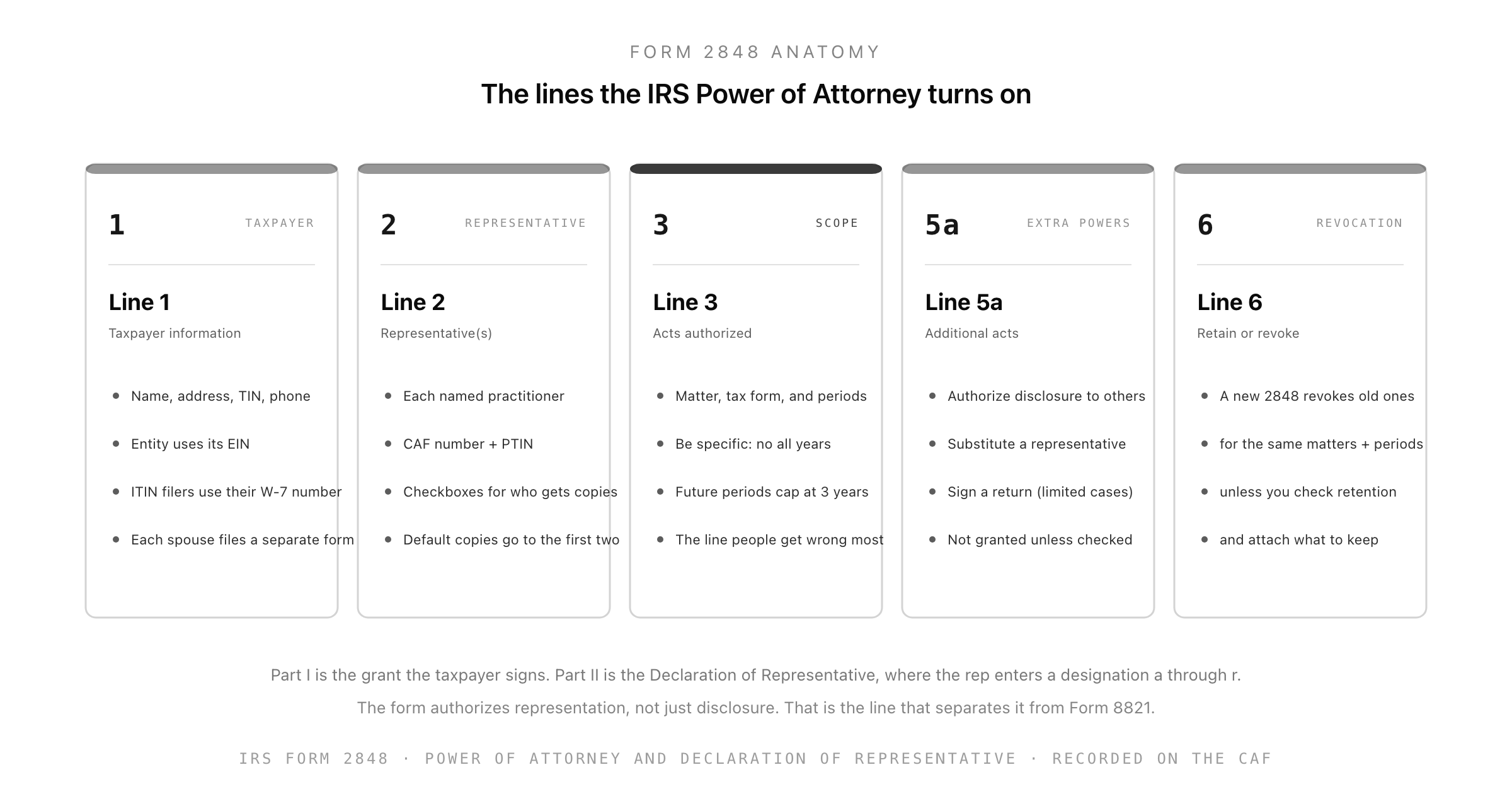
Line 1, Taxpayer information. Your name, address, taxpayer identification number, and daytime phone. If you are a business, use the entity name and its EIN (the number you were issued on your SS-4). If you do not have a Social Security number and file under an ITIN, use the number from your W-7. On a jointly filed return, each spouse who wants representation must file a separate Form 2848; one form does not cover both.
Line 2, Representative(s). Name and address of each person you are naming, along with their CAF number, PTIN, telephone, and fax. There are checkboxes here that control which representatives receive copies of notices and communications. By default the IRS will send copies to the first two representatives you list; deeper down the list, you have to manage it deliberately.
Line 3, Acts authorized. This is the heart of the form and the line people get wrong most often. You describe the matter (Income, Employment, Payroll, Excise, Estate, Gift, a Civil Penalty, the Section 4980H Shared Responsibility Payment, a Whistleblower claim, and so on), the tax form number it relates to (1040, 941, 1120, and the like), and the years or periods. The periods have to be specific. You cannot write "all years" or "all periods." You can list future periods, but only up to three years after the year the IRS receives the form. A return you cannot yet identify by year cannot be covered.
Line 4, Specific use not recorded on the CAF. Check this only for a one-time matter that the IRS does not record on the Centralized Authorization File, such as a private letter ruling request or certain applications. Most authorizations are left unchecked so they post to the CAF and are visible to any IRS employee who pulls up your account.
Line 5a, Additional acts authorized. The extra powers: authorize disclosure of your return information to third parties, substitute or add another representative, sign a return on your behalf (allowed only in the narrow circumstances of disease or injury, continuous absence from the country for at least 60 days, or specific permission from the IRS), access your records through an Intermediate Service Provider, and other acts you spell out. If you want your representative to have one of these, you have to check it.
Line 5b, Specific acts not authorized. The mirror image: anything you want to carve out and withhold.
Line 6, Retention or revocation of prior power(s) of attorney. Filing this form automatically revokes all earlier 2848s on file for the same matters, tax form numbers, and periods, unless you check the box on Line 6 and attach copies of the authorizations you want to keep alive. If you switch accountants but want the old firm to retain authority over a still-open year, this is the line that protects it.
Line 7, Signature of taxpayer. Your signature, the date, and your title if you are signing for an entity. An unsigned or undated Line 7 is the single most common reason a 2848 bounces.
The CAF Number and How to Submit the Form
The CAF number is a unique nine-digit identifier the IRS assigns to a representative the first time they file an authorization. It is not a credential and it does not expire; it is simply the key the IRS uses to file the authorization against your account in the Centralized Authorization File. A new representative who has never filed a 2848 writes "None requested" in the CAF field, and the IRS issues a number with the first submission.
There are three ways to get the form to the IRS in 2026, and they differ a lot in speed:
- Mail or fax to the CAF unit. The instructions carry a "Where To File" chart that points you to Ogden, Memphis, or (for international authorizations) Philadelphia based on your state. This is the traditional route and the slowest, because the forms queue for manual processing.
- Submit Forms 2848 and 8821 Online. A secure upload tool on IRS.gov, available to anyone with an IRS Secure Access account, that accepts a form with either a handwritten or an electronic signature. It still routes to the same CAF units, but it removes the fax machine from the equation.
- Tax Pro Account. A representative with a Tax Pro Account can initiate a digital authorization request that lands in your IRS Online Account for you to approve. Approved requests record to the CAF the fastest, often within a couple of days. The trade-off is scope: a Tax Pro Account POA covers a narrower set of situations than a full paper 2848, so complex authorizations still go on the form.
Form 2848 vs Form 8821: Representation vs Information
The most common point of confusion around the IRS POA is the difference between Form 2848 and Form 8821, Tax Information Authorization. They look similar, both record to the CAF, and both can be submitted through the same online tool, but they grant fundamentally different things.
Form 2848 grants representation. The person you name can argue, negotiate, sign, and advocate, and they must be an eligible practitioner under one of the designations a through r.
Form 8821 grants information access only. The appointee can inspect and receive your confidential tax information, but cannot represent you, cannot speak for you in an examination, and cannot sign anything on your behalf. The upside is that anyone can be an 8821 appointee: an individual, a firm, a lender, an organization. There is no eligibility test, because no representation is being handed over.
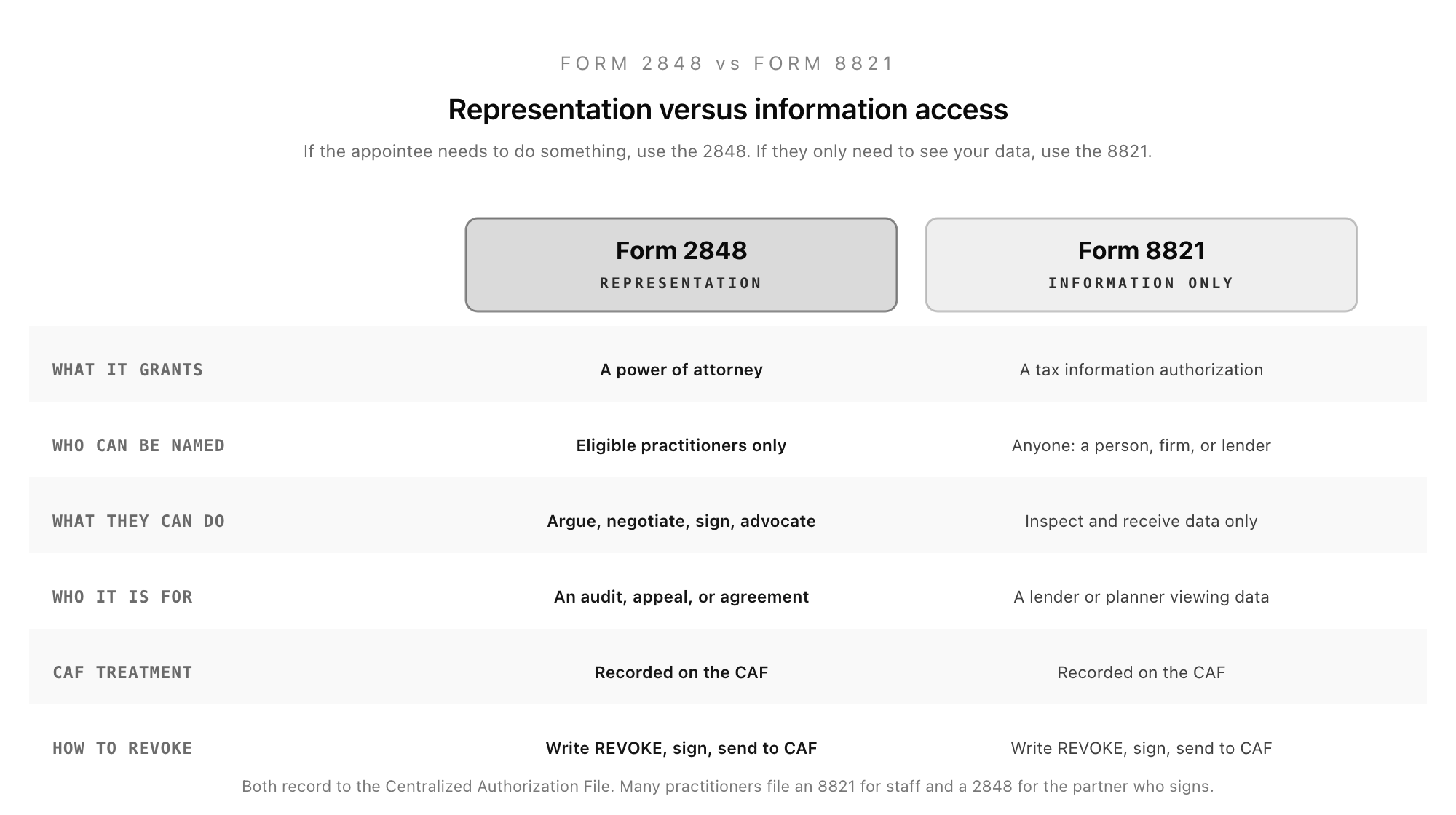
The practical rule: if your appointee needs to do something with the IRS, use the 2848. If they only need to see your information, a mortgage lender verifying income or a financial planner reviewing your transcripts, the 8821 is the lighter, broader tool. Many practitioners file both: an 8821 for the staff who pull transcripts and a 2848 for the partner who will sign the closing agreement.
How to Revoke a Form 2848
Authorizations outlive engagements, so knowing how to end one matters as much as knowing how to grant it. There are two clean ways to revoke a 2848.
If you want to revoke without naming a new representative, take a copy of the 2848 you previously filed, write "REVOKE" across the top, sign and date underneath that annotation, and send it to the same CAF unit that received the original. If you no longer have a copy of the form, send a signed statement of revocation instead, listing the matters, the tax form numbers, the periods, and the names of the representatives whose authority you are ending.
If you are replacing a representative, you usually do not need a separate revocation at all: filing a new 2848 automatically revokes the prior one for the same matters and periods, unless you preserve it on Line 6. A representative who wants to step down does the mirror version, writing "WITHDRAW" across a copy of the form and signing it.
Revocations are processed by the same CAF units and through the same submission routes as the original, so an online submission revokes faster than a mailed one.
Gather the Details Cleanly Before You File
Most rejected 2848s fail on small, avoidable things: a missing CAF number, an "all years" entry on Line 3, an unsigned Line 7, a designation letter left blank in Part II. The fix is to collect the right data once, before anyone starts filling in boxes.
A clean intake captures the taxpayer's legal name and TIN, each representative's name, designation, CAF number, and PTIN, the exact matters and periods to authorize, and the explicit yes-or-no on the Line 5a additional acts. Get those right at the start and the form itself becomes a transcription job rather than a guessing game.
Clone the Good Form 2848 intake template to gather everything an IRS Power of Attorney needs in one pass, then build your own intake forms free with Good Form for the rest of your client onboarding. The form does not file the 2848 for you, the IRS records that through the CAF, but it makes sure the authorization you submit is right the first time.