A direct deposit form is the document that turns a new hire's bank details into a payroll-ready instruction. When it works, the first paycheck lands in the right account on the right day and nobody mentions it. When it does not work, payroll is reverse-engineering a returned ACH on day fourteen, the employee is asking why a paper check arrived, and somebody in HR is scanning a smudged voided check at 4pm. The fix is not a more sophisticated payroll system. The fix is a direct deposit form with the right nine fields, a working verification step, and an authorization clause that holds up.
This guide gives you three drop-in direct deposit form templates (basic single-account, multi-account split, and ACH-vendor compatible), the 9-field spine every version shares, and the authorization language payroll providers actually require. If you want to skip the reasoning and put the form in front of a new hire today, clone the Good Form direct deposit template and customise it in five minutes.
The short version:
- A working direct deposit form has nine fields: employee identity, request type, bank name, 9-digit ABA routing number, account number, account type (checking or savings), deposit allocation rule, verification method, effective date, and a signed authorization. Anything fewer and payroll is missing data. Anything more and people skip fields.
- Three templates cover the cases HR actually runs: basic (single account, full pay), multi-account split (primary + secondary, fixed amount or percentage), and ACH-vendor compatible (NACHA-aligned fields, pre-note flag, micro-deposit verification). Same spine, different deposit logic.
- The two verification methods that work in practice are voided check and micro-deposit. Voided check is faster (one upload, done). Micro-deposit is more reliable (penny test confirms the account exists and accepts ACH credits). Pick one as the default; offer the other as a fallback.
- The authorization clause is not optional. Federal Reg E and most state payroll statutes require a written, signed authorization before any direct deposit can run. The clause names the employer, the account, the right to reverse erroneous deposits, and a cancellation route. A checkbox plus a signature field on the form is enough.
- Clone the Good Form direct deposit template so the new hire's banking details are timestamped, structured, and verifiable in one step instead of becoming a smudged photo of a voided check in your email.
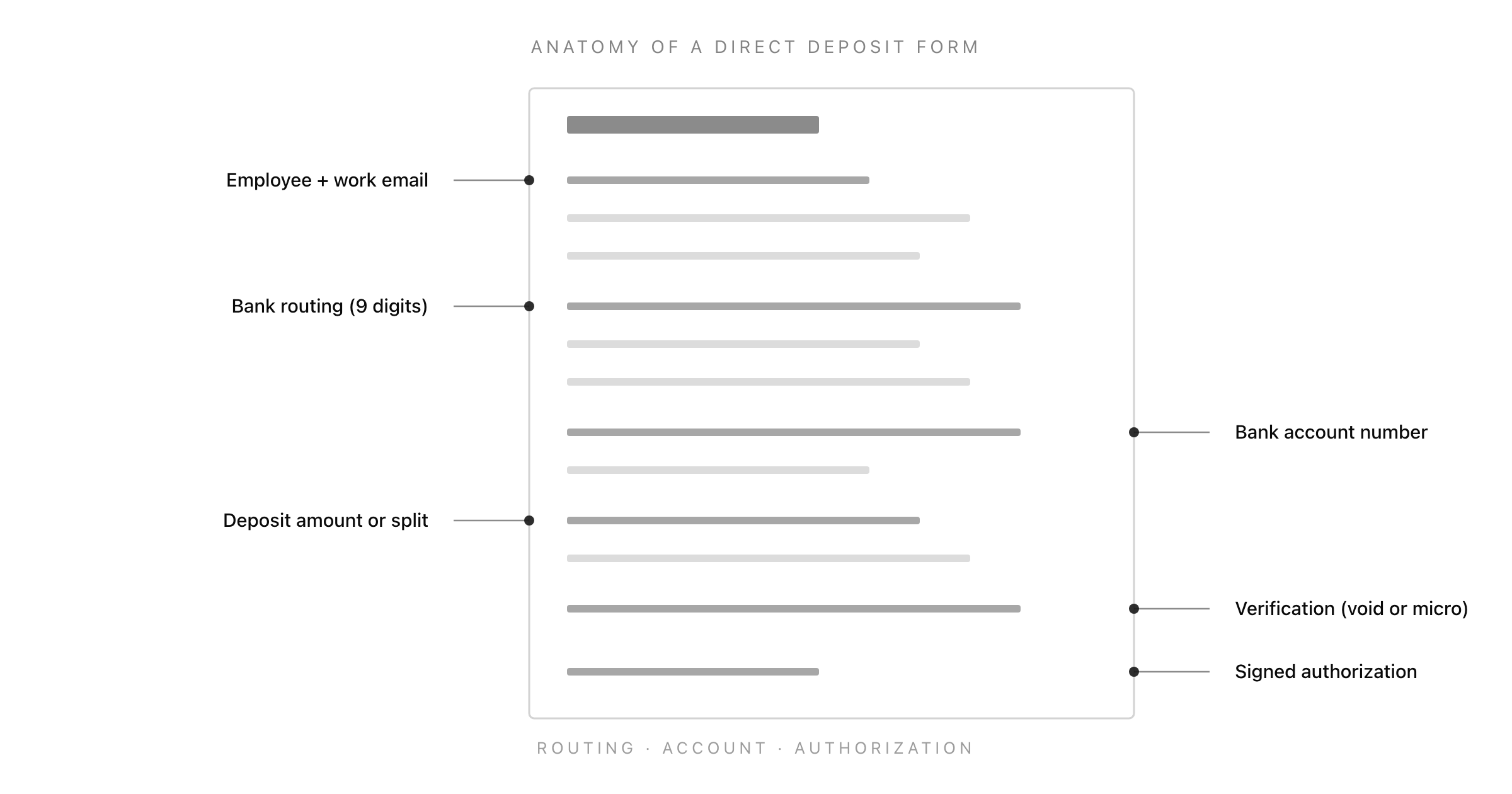
What a Direct Deposit Form Actually Does
A direct deposit form has one job: convert an employee's banking details into an instruction the payroll provider can execute on the next pay cycle. It is not a banking application. It is not a payroll system. It is the entry point for a single ACH credit instruction with a legally required authorization attached to it.
The four things a direct deposit form is not:
- A bank account opening form. The employee already has an account. The form captures the existing account's details, it does not provision anything.
- A payroll cycle calculator. The form references the cycle (effective date), it does not compute it. Pay frequency and pay date logic live in payroll, not on the form.
- A tax form. Direct deposit forms get conflated with W-4 / W-9 / state tax forms because they all show up in the same onboarding pile. They are different documents with different authorities. Mixing tax withholding fields onto a direct deposit form creates compliance issues.
- A multi-step approval workflow. There is no approval. The employee submits banking details, payroll verifies the account, the deposit runs. A "manager approval" step on a direct deposit form is process theatre and a privacy problem.
What a direct deposit form is: a structured record of who the employee is, which bank account receives their net pay, how the deposit should be allocated, how the account was verified, and a written authorization permitting the employer to credit (and reverse) that account.
The Nine-Field Spine Every Direct Deposit Form Needs
Every working direct deposit form, regardless of single-account or multi-account configuration, contains the same nine fields. The differences between the basic, split, and ACH-vendor templates are in the allocation field and the verification rule, not the structure.
1. Employee Identity (Name + Work Email)
The submitter. Two fields, both required. Email is what payroll matches against the employee record. Adding employee ID is optional; it helps if your payroll system uses one, otherwise skip it. Email is enough on its own.
2. Request Type
A select field, not a free-text field. Four options cover almost every case: new direct deposit setup, change existing account, add a second account (split deposit), and cancel direct deposit. The select serves payroll routing, not the employee. A "change account" request runs differently from a "new setup" request inside most payroll systems, and the form needs to flag which one this is at submit time.
3. Bank Name
A text field. Required. Strictly speaking the bank name is redundant once you have the routing number (the ABA database resolves the institution), but capturing it on the form gives payroll a sanity check. If the employee writes "Chase" and the routing number resolves to "Bank of America", that is a typo to catch before the deposit runs, not after.
4. Bank Routing Number (ABA, 9 Digits)
A text field with length validation. Required. The routing number is the 9-digit ABA number that identifies the bank for ACH transactions. It is the first number on the bottom of a US check. Length validation matters: payroll systems will reject any routing number that is not exactly 9 digits, and catching the error at the form is much cheaper than catching it as a returned ACH on payday.
A routing number is not the same as a SWIFT code (international wires) or a sort code (UK). If you employ people outside the US, the form needs a different field set. This guide is US-centric; non-US payroll uses different rails.
5. Bank Account Number
A text field. Required. The account number is the second number on the bottom of a US check, after the routing number. Account number lengths vary by bank (typically 6 to 17 digits) so the form should not enforce a fixed length; it should require numeric-only input.
The account number is sensitive PII. The form should be transmitted over HTTPS, stored encrypted at rest, and accessible only to payroll-authorized roles. If the form lives inside a general HR tool that does not have payroll-grade access controls, the account number should never be stored there in clear text. This is the field that gets companies in trouble in a breach.
6. Account Type (Checking or Savings)
A radio button. Required. Two options: checking, savings. The ACH network treats them differently (different transaction codes, different bank fees on the receiving end), so payroll has to know which one. The temptation to default to "checking" and skip the field is one of the most common reasons direct deposits get returned. If the employee gave a savings account number and the form sent it through as checking, the receiving bank may bounce the credit.
7. Deposit Allocation
A radio button with three options: full net pay to this account, fixed amount to this account (rest to existing), percentage of net pay to this account.
This field is what determines which template you are using. On a basic form, "full net pay" is the only option. On a split form, the second and third options become required, paired with an allocation amount field below. On an ACH-vendor compatible form, the allocation rule is captured in NACHA-aligned format (specific dollar amount or percentage with two-decimal precision).
The split-deposit case is the most common reason a direct deposit form fails: HR captured a primary account and a secondary account but did not capture the allocation rule between them, so payroll arbitrarily routes the full pay to the primary and the employee finds out on payday.
8. Verification Method
A select field. Required. Three options: voided check attached, bank letter or direct deposit form from bank attached, micro-deposit verification (penny test).
The verification step is the single most common reason a direct deposit form gets bounced back to the employee. There are two methods that work in practice and one method that does not.
Voided check. The employee writes "VOID" across a blank check from the account, photographs it, and uploads it. The check shows the routing number, the account number, and the bank name on bank-printed stock. This is the fastest verification and the one most US payroll systems accept by default. The failure mode is that fewer employees have paper checks than they did ten years ago. If the employee opened the account online, they may not have any.
Bank letter or direct deposit form from bank. The employee asks their bank for a "direct deposit verification" letter (most US banks issue these on demand). The letter restates the routing and account number on bank letterhead and is the cleanest substitute for a voided check. Slower than a voided check (the employee has to request it) but cleaner than a typed-in number.
Micro-deposit verification (penny test). The form captures the account, then triggers a small ACH credit (typically $0.01 to $0.99) with a corresponding debit a day or two later. The employee logs into their bank, sees the amounts, and confirms the values back through the form. This proves the account exists, accepts ACH credits, and is held by someone who can read the balance. It takes 2-3 business days to complete and is the standard for ACH-vendor compatible setups.
The choice between these three is mostly operational. If your team is small and onboarding paper checks are still common, voided check is fastest. If you run a fully remote team or use a payroll-tech vendor (Gusto, Rippling, Deel, Justworks), micro-deposit is the cleaner default and almost always built in.
9. Effective Date and Signed Authorization
The last two fields are the legal core of the form, not procedural extras.
Effective date. A date field. Required. The first pay cycle the new account should apply to. If the employee submits the form mid-cycle, the effective date should be the next pay cycle, not the current one (current-cycle changes can cause partial deposits and reversals). Most payroll systems will refuse to apply a direct deposit change inside a 5-day pre-pay-date window; the form should set the effective date to the next safe cycle automatically.
Signed authorization. A required checkbox plus a signature line (or a typed e-signature equivalent). The authorization clause names the employer, names the account, and grants two specific rights: the right to credit the account on each pay cycle, and the right to reverse erroneous deposits. The clause is not boilerplate. Federal Reg E and most state payroll statutes require this in writing before any direct deposit can run. A direct deposit form without a signed authorization is not a direct deposit form, it is a banking memo.
The exact authorization language is below in the legal section.
The Three Direct Deposit Form Templates
Three deposit configurations cover almost every HR setup. The fields are the same. What changes is the allocation logic, the verification rule, and one or two helper fields.
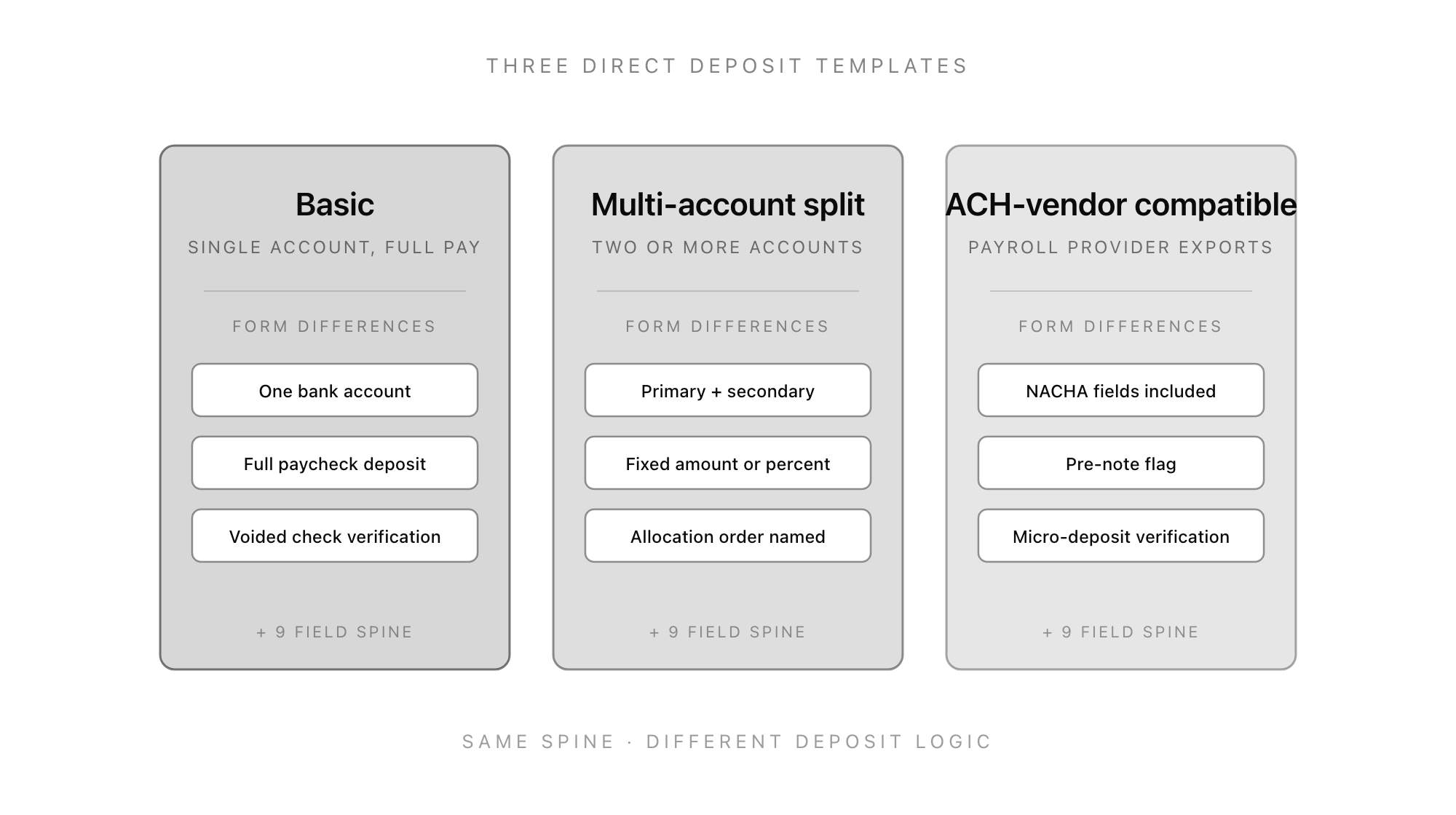
Template 1: Basic Direct Deposit Form
Used by: most small businesses, anyone running payroll on a single bank account per employee, anyone whose payroll provider does not support split deposits or treats them as a paid add-on.
The differences from the spine:
- Single account only. The allocation field collapses to one option: full net pay to this account.
- Voided check is the default verification. The form should accept a file upload (image or PDF) and treat the upload as the verification step in itself. No micro-deposit cycle required.
- Effective date defaults to the next pay cycle. The form pre-fills based on the submission timestamp and the company's pay schedule.
The form should also flag any submission where the routing number fails ABA checksum validation, the account number contains non-numeric characters, or the voided check upload is missing. Each of those is a reject-before-payroll case and the form should catch them at submit time.
Template 2: Multi-Account Split Direct Deposit Form
Used by: anyone who lets employees split pay across two or more accounts, anyone with employees who want a portion of pay diverted to savings, retirement, or a household account.
The differences from the spine:
- Primary plus secondary account fields. The form repeats fields 3 through 6 (bank name, routing, account number, account type) for each additional account. Most teams cap at two accounts; some allow up to four.
- Allocation rule per account. The radio button changes meaning: each non-primary account gets either a fixed dollar amount or a percentage. The primary account always receives "remaining net pay" by definition.
- Allocation order named. The form requires the employee to state which account receives the deposit first when amounts are fixed. If the secondary fixed amount exceeds the actual paycheck (rare but possible during partial pay periods), this rule is what prevents an over-deposit.
The unspoken risk with multi-account split forms is that the math has to add up. If the employee allocates $500 to savings, $300 to a household account, and "remainder" to checking, but the actual paycheck is $700 net, the form needs to specify what happens. Two options: pay in allocation order until the paycheck is exhausted (the most common rule), or pro-rate across all accounts. The form should state the rule, not leave it implicit.
Template 3: ACH-Vendor Compatible Direct Deposit Form
Used by: companies running payroll through a vendor (Gusto, Rippling, ADP, Deel, Justworks), anyone integrating with a payroll API, anyone whose finance team has a NACHA file export step.
The differences from the spine:
- NACHA-aligned field formats. Account numbers stripped of non-numeric characters, routing numbers padded to 9 digits, account types coded as "22" for checking and "32" for savings (the NACHA transaction codes). The form does this transformation automatically before submission.
- Pre-note flag. A checkbox indicating whether to run a zero-dollar pre-notification before the first live deposit. Pre-notes catch routing or account errors one cycle ahead of the live transfer; most payroll vendors run them by default for new accounts.
- Micro-deposit verification as the default. The form triggers a penny test at submit time and gates the "verified" status on the employee confirming the values. Voided check is offered as a fallback for employees who do not have access to their online banking.
The ACH-vendor template is the one most growing companies should be using by the time they reach 25 employees. The NACHA transformation, pre-note, and micro-deposit verification together cut bounced deposits to near-zero. The friction is that the verification cycle takes 2-3 business days, so the form has to be submitted well before the first pay cycle.
What the Authorization Clause Has to Say
Federal Reg E and most state payroll statutes require a written, signed authorization before any direct deposit can run. The clause does not have to be long, but it has to cover four points.
1. Identification of the employer. Who is being authorized to make the deposits. Full company name, not just a brand.
2. Identification of the account. Which account is being authorized. The form-captured routing and account numbers serve this purpose; the clause does not need to repeat them, but it should say "the bank account identified above".
3. Right to credit and reverse. The two operations being authorized: credit the account on each pay cycle, reverse any erroneous deposit. The reversal right is the field most boilerplate authorizations omit; without it, an over-deposit becomes a debt-collection problem.
4. Cancellation route. How the employee can revoke the authorization. Typically "in writing, with reasonable notice" (5-10 business days is the standard).
A working clause reads roughly like this:
I authorize [Company Name] to deposit my net pay into the bank account identified on this form, and to reverse any erroneous or duplicate deposits made to that account. This authorization will remain in effect until I provide written notice to revoke it, with no fewer than 7 business days' notice before the next pay cycle. I confirm that the routing and account numbers on this form are accurate and that I am the authorized owner of the named account.
Pair the clause with a required checkbox ("I have read and agree to the authorization above") and a signature field (typed name plus timestamp is enough for an e-signature, or a drawn signature for paper). Together those satisfy the written-authorization requirement under Reg E and the equivalent state statutes.
Common Direct Deposit Form Mistakes (and How to Avoid Them)
A short list of mistakes that show up in almost every iteration of this form across small HR teams.
- Capturing the account number twice without confirming it matches. The single most common form failure. Use a "re-enter account number" field with client-side match validation. Eliminates almost all account-number typos.
- Skipping checking-vs-savings. Defaulting to "checking" guarantees a recurring rate of bounced credits to savings accounts. Always require the radio button.
- Storing the form alongside the W-4. Different document, different authority, different access requirements. The direct deposit form should live with payroll, the W-4 with HR, and the two should not share an unrestricted retention bucket.
- Letting employees email a photo of a voided check. Email is not encrypted, the photo lives in the inbox forever, and the recipient has no audit trail. Always route through a form that uploads the file directly into payroll-grade storage.
- Asking for a Social Security number. Don't. The direct deposit form does not need one. SSN belongs on the I-9 and the W-4. Mixing it onto the deposit form expands the breach surface for no operational reason.
- No effective-date logic. If the form lets the employee pick today's date as the effective date during the pre-pay-date freeze window, the change either silently delays one cycle (annoying) or partially applies (worse). Always pre-fill the next safe cycle.
- Missing the reversal authorization. The single most common authorization-clause omission. Without it, the employer cannot legally claw back a duplicate deposit, which becomes a real problem the first time payroll fat-fingers a number.
The Bottom Line
A direct deposit form is a small piece of payroll infrastructure that becomes invisible when it works and very visible when it does not. The shape of the form is straightforward: nine fields, one of three deposit configurations, one verification method, one signed authorization clause.
Most teams over-engineer this. They build a banking-style account intake when what they need is a form. They write a 22-field intake when what they need is 9. They reinvent verification when voided check or micro-deposit already work.
If you want the form in production today, clone the Good Form direct deposit template and customise the authorization clause to name your company. If you want to see how the same approach applies to other HR forms, the employee onboarding form, the employment verification form, and the PTO request form all use the same shape: a small set of well-shaped fields, one decision, and a paper trail you can defend.
Getting paid is the simplest reciprocal promise an employer makes. It deserves a form that respects that.