Multiple choice questions are the most common question format in the world, used in everything from customer surveys to school exams, and they are deceptively hard to write well. A good multiple choice question gives you clean, countable data or a fair test of knowledge. A bad one, with overlapping options, an ambiguous stem, or a set of answers that does not cover every case, quietly forces people into the wrong box and hands you results you cannot trust. The format looks simple, but the quality lives entirely in the details, and those details are learnable.
This guide covers what a multiple choice question actually is, the difference between single-select and multi-select, how to write clear stems and clean answer options, how MCQs differ between surveys and quizzes, worked examples, and the mistakes that undermine the results. Whether you are building a satisfaction survey or a training quiz, the same principles separate a question that measures from one that misleads.
What Is a Multiple Choice Question?
A multiple choice question is a question that offers a fixed set of answer options for the respondent to choose from, rather than asking them to write an answer in their own words. It has two parts: the stem, which is the question or prompt itself, and the options, which are the possible answers. In a knowledge test, one option is the correct answer (the key) and the rest are wrong answers designed to be plausible (the distractors); in a survey, there is no right answer, just a set of choices that should cover how people actually think.
The reason multiple choice is everywhere is that it produces structured, countable data. Because everyone picks from the same list, you can tally the results in seconds, chart them, and compare them over time. That is a decisive advantage over open-ended text, which is rich but slow to analyse. The trade-off is that a multiple choice question can only capture answers you thought to include, which is why writing the options well matters so much: a missing or badly-worded option is invisible in the results but silently distorts them.
Single-Select vs Multi-Select
The first decision when building a multiple choice question is how many options the respondent may choose, and getting this right prevents a surprising amount of confusion.
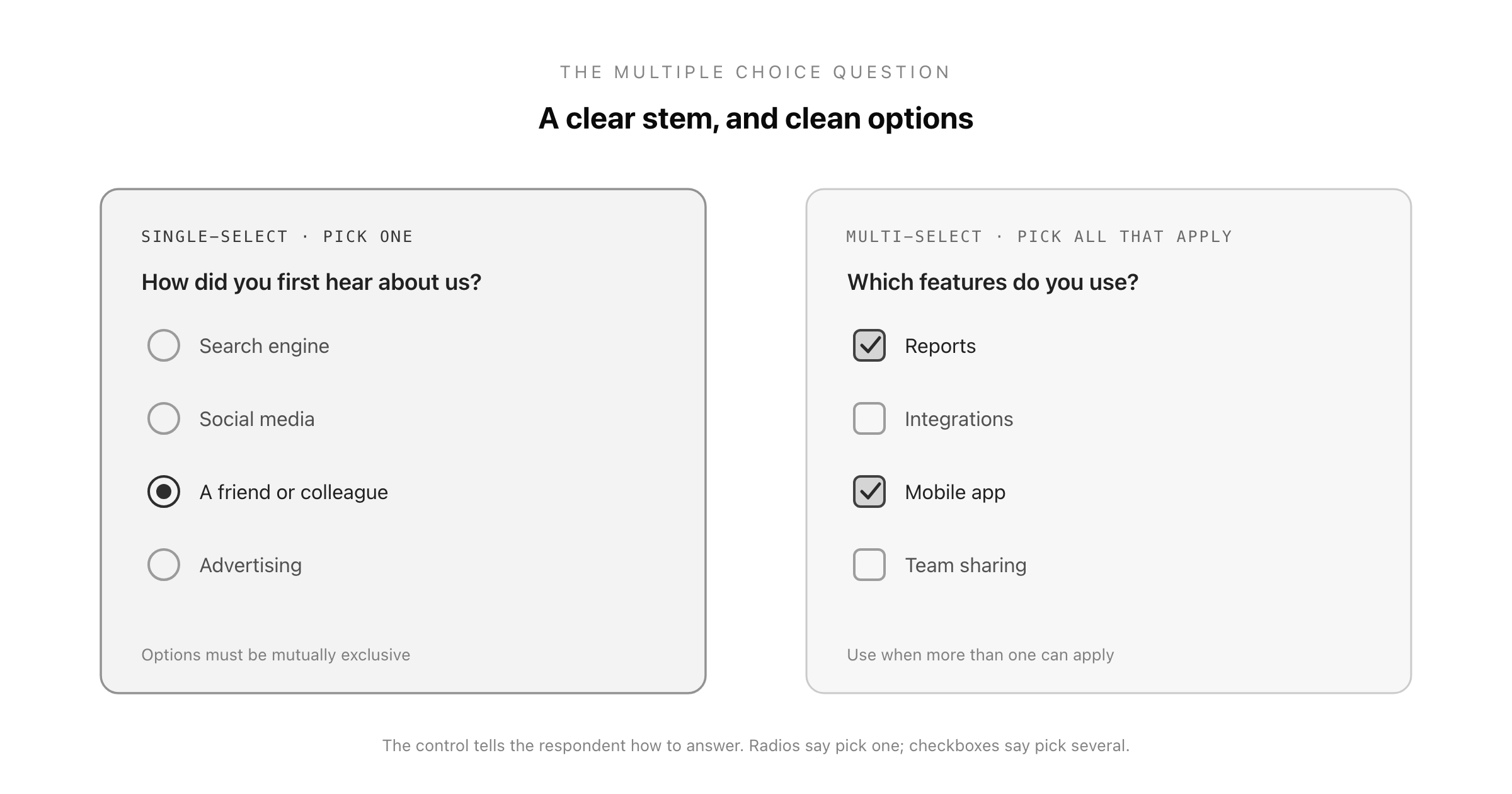
Single-select (radio buttons) allows exactly one answer. Use it when the options are mutually exclusive, when only one can logically be true. "What is your primary reason for cancelling?" or "Which plan are you on?" The whole point of single-select is that the choices do not overlap, so the respondent is never stuck between two correct answers.
Multi-select (checkboxes) allows any number of answers, including none. Use it when more than one option can genuinely apply. "Which of these features do you use?" invites several ticks, and forcing it into single-select would produce misleading data. The signal to the respondent is important too: radio buttons say "pick one," checkboxes say "pick all that apply," and mixing up the control confuses people into answering wrongly.
A related format is the dropdown, which is functionally a single-select with the options hidden in a menu. Use it only to tidy a long but known list (country, department, job title). For short lists of five or fewer, visible options are always easier to answer than a dropdown that hides the choices.
How to Write Good Multiple Choice Questions
Whether for a survey or a test, a few disciplined rules prevent almost every common failure.
Write a clear, complete stem. The question should be fully understandable before the respondent even reads the options. "Which of the following?" is not a stem; "Which of the following best describes your role?" is. Put the substance in the stem, not scattered across the answers.
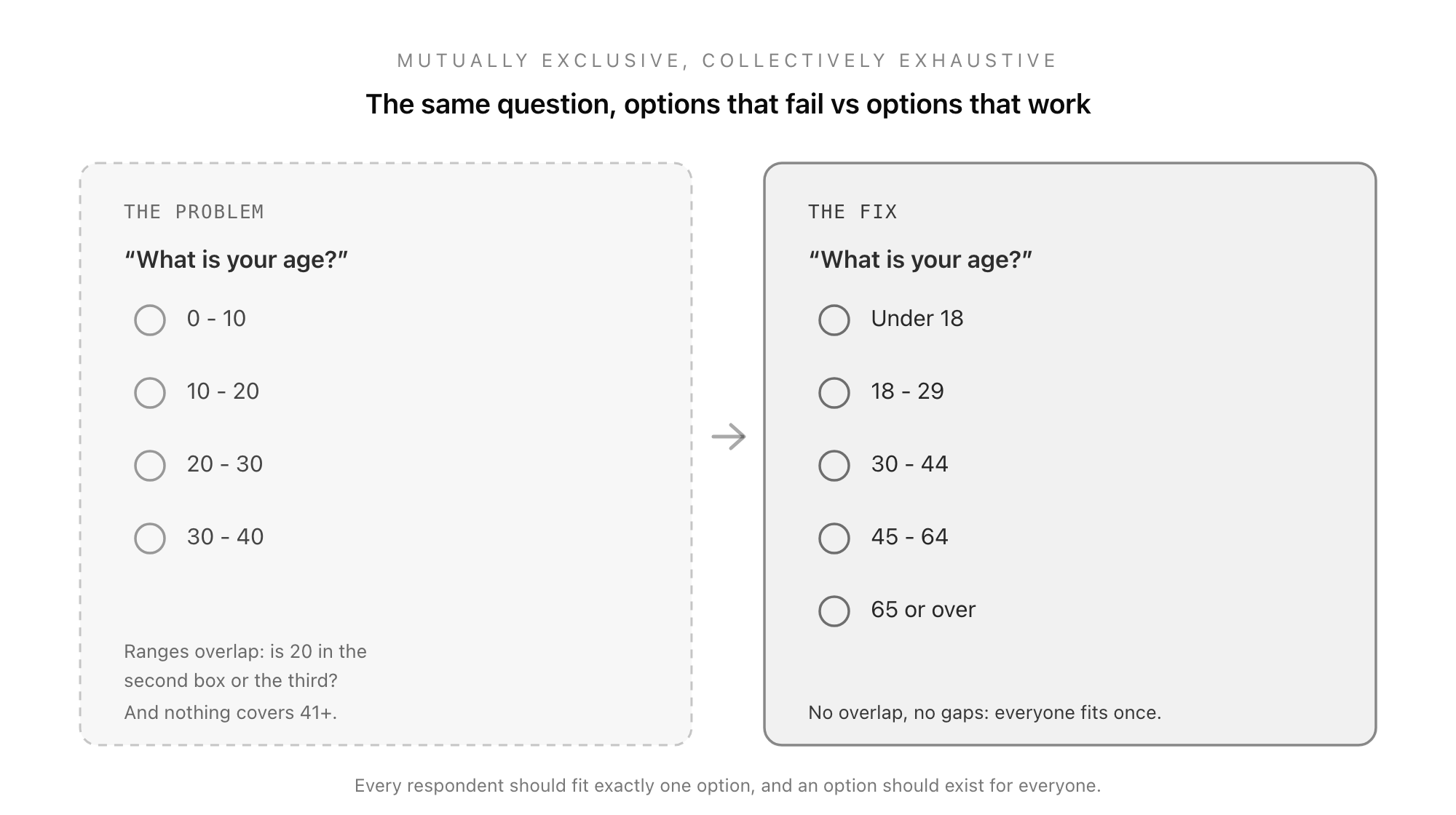
Make options mutually exclusive. Overlapping options are the classic error, especially with numbers. Age ranges "20-30" and "30-40" both contain 30, so a thirty-year-old cannot answer cleanly. Use "20-29" and "30-39" instead. Every respondent should fit exactly one option in a single-select.
Make options collectively exhaustive. The set should cover every plausible answer. When you cannot list them all, add an "Other" (ideally with a text box) or a "None of the above" so nobody is forced into a wrong choice. A respondent with no valid option will either abandon the question or pick something false.
Keep options parallel and consistent. Answers should be similar in length, grammar, and format. In quizzes especially, a correct answer that is noticeably longer or more detailed than the distractors gives itself away, and inconsistent phrasing makes any question harder to read.
Avoid "all of the above" and "none of the above" as crutches. In tests, "all of the above" lets a student who recognises two correct options deduce the answer without knowing the rest, and a single obviously-wrong option rules it out entirely. Use these sparingly and deliberately, not as filler.
Avoid negatives and double negatives. "Which of these is NOT a benefit?" trips people up, and the mistakes it causes measure reading care, not knowledge or opinion. If you must use a negative, highlight it clearly.
Multiple Choice Questions for Surveys vs Quizzes
The same format serves two quite different purposes, and knowing which you are building changes how you write it.
In surveys, there is no right answer. You are measuring opinion, behaviour, or preference, so the goal is a set of options that genuinely reflects how people think, phrased neutrally, with an escape hatch for the ones you did not anticipate. The risk is bias: leading options or a lopsided set will skew the result. For the wider rules on writing survey items that measure rather than mislead, see the guide to survey questions.
In quizzes and tests, there is a correct answer. Now the craft is in the distractors: wrong options that are plausible enough to test real understanding, not so obviously wrong that the answer is given away. Good distractors often reflect common misconceptions, which also makes the results diagnostic, showing you not just who got it wrong but how. Fairness matters here, so consistency of length and format is essential.
Recognising which mode you are in stops the most common confusion, treating a survey question as if it has a right answer, or writing a quiz question with careless throwaway distractors.
Multiple Choice Question Examples
Survey, single-select (mutually exclusive):
- "How did you first hear about us?": Search engine / Social media / A friend or colleague / Advertising / Other
Survey, multi-select (pick all that apply):
- "Which of these features do you use regularly?": Reports / Integrations / Mobile app / Team sharing / None of these
Quiz, single-select (one correct answer, plausible distractors):
- "Which metric measures loyalty by asking how likely someone is to recommend you?": CSAT / NPS / CES / Conversion rate
For rating-style questions where you want intensity rather than a category, a Likert scale is usually the better tool, and for measuring satisfaction specifically, the customer satisfaction survey guide covers which format fits.
Common Multiple Choice Mistakes
- Overlapping options. Ranges or categories that share a value force arbitrary answers. Keep them mutually exclusive.
- Gaps in the options. A set that does not cover every case, with no "Other," pushes people into false answers.
- An unclear or overloaded stem. If the question is ambiguous or hides information in the options, the data measures confusion.
- Give-away distractors in quizzes. A correct answer that is longer, more precise, or oddly phrased is easy to spot without knowing the material.
- Too many options. A dozen choices overwhelms respondents and fragments the data. Keep the list focused.
- Using single-select where multi-select belongs. Forcing one answer when several apply throws away real information and frustrates respondents.
Build Multiple Choice Questions That Work
A well-written multiple choice question still needs a form that presents it cleanly: the right control for single versus multiple answers, options that are easy to scan, and responses collected in a structured way you can actually count. That is exactly where a proper form builder beats a hand-made document, handling radio buttons, checkboxes, and dropdowns consistently and gathering the answers in one place ready to analyse.
You can build any multiple choice survey or quiz in minutes with the free form builder, choosing single or multi-select per question and keeping the whole thing consistent and countable. If you are still choosing a tool to run it on, the guide to the best free form builders covers what to look for.
Build your multiple choice form in Good Form →
Whatever you build it on, the discipline is the same: a clear stem, options that are mutually exclusive and collectively exhaustive, the right select mode, and, for quizzes, distractors that are plausible without giving the game away. Get those right and the humble multiple choice question becomes one of the most reliable tools you have, whether you are measuring what people think or testing what they know.