A roster is the plan of who is working when. It is the document that decides whether a shift is covered, whether someone gets a weekend off, whether the person on duty is actually qualified to do the job, and whether your wage bill lands where you budgeted. Every organisation running shifts, a cafe, a ward, a warehouse, a security team, a care home, a bar, builds one, and almost everyone building one is doing it under more constraints at once than any single spreadsheet comfortably holds. That is why rostering is genuinely difficult work, and why it tends to be done at the last minute by a manager who would rather be doing something else.
This guide covers what a roster is, how it differs from the words it gets confused with, what a roster must include, the constraints it has to satisfy simultaneously, the common shift patterns and when each suits, a step-by-step way to build one, how to handle swaps and absence, and the mistakes that make an otherwise fine roster fall apart.
What Is a Roster?
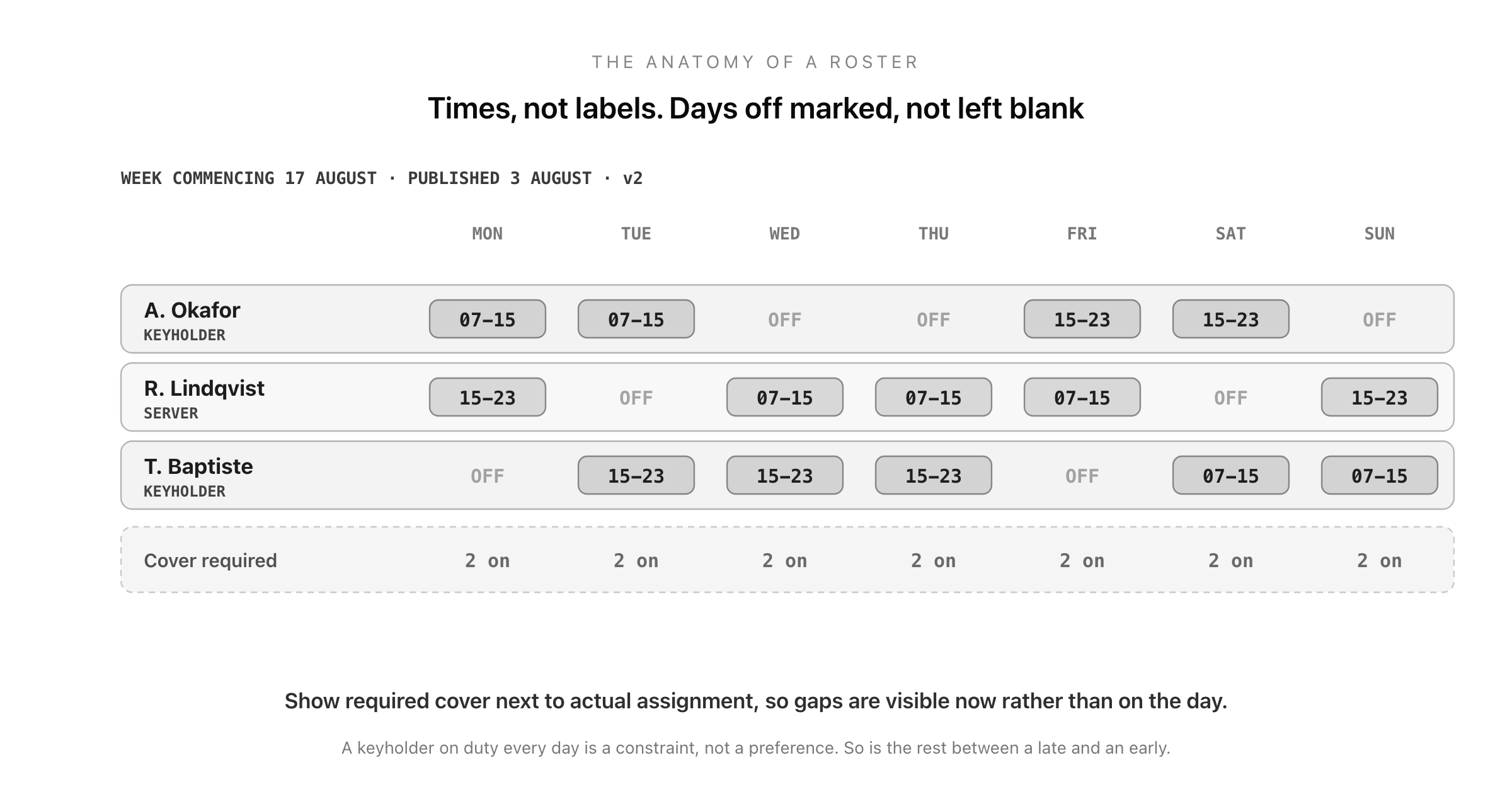
A roster is a forward-looking schedule that assigns named people to specific shifts across a defined period, usually a week, a fortnight, or a month. Its job is to guarantee that every hour the operation is open has the right number of people with the right skills present, while staying inside legal limits, contracted hours, and budget.
The word varies by region and sector. In the UK and Ireland the same document is usually called a rota; in Australia and much of healthcare worldwide it is a roster; in the US it is more often just the schedule. They mean the same thing, and if you search for a template you will find all three words used interchangeably.
What makes rostering distinctively hard is that it is a constraint-satisfaction problem dressed up as a grid. You are not just filling boxes: you are simultaneously meeting demand, respecting availability, matching qualifications, obeying rest rules, distributing unpopular shifts fairly, and hitting a cost target. Change one cell and you can break three of those at once, which is exactly why the last-minute version so often produces a roster somebody has to fix by hand on the day.
Roster, Rota, Schedule, Timesheet, Attendance
Four documents sit next to each other and get muddled constantly. Keeping them apart clarifies what each is for.
A roster (or rota) is the plan: who is scheduled to work, in the future.
A timesheet is the record of hours worked, filled in afterwards, and it is what drives pay and client billing. The guide to timesheets covers what belongs on one.
An attendance record answers the simpler question of who actually turned up for each scheduled session, which is what makes it the basis of absence management and roll call. See the guide to attendance for how to structure it.
An availability form is the input: when each person can and cannot work, collected before the roster is built.
The relationship is a cycle: availability feeds the roster, the roster sets expectations, attendance records what happened against it, and the timesheet records the hours that get paid. When those four live in four unconnected places, the gaps between them are where disputes come from, because nobody can reconstruct what was scheduled versus what happened.
What a Roster Must Include
The period covered, with clear start and end dates, and a version or publication date so everyone knows which roster is current. Superseded versions circulating is a classic cause of missed shifts.
Every person, by name, with their role.
Every shift, with start and finish times, not just a label. "Late" means different things to different people; "16:00 to 00:00" does not.
Break times, where they are fixed, or at least the entitlement.
The role or station each person is covering, where that matters, so it is visible that the qualified person is on.
Required cover per shift, ideally shown alongside actual assignment, so gaps are visible at a glance rather than discovered on the day.
Days off, marked explicitly rather than left blank. A blank cell is ambiguous; "OFF" is not.
Known absences, such as approved leave and training, so nobody is scheduled into them.
On-call or standby cover, and who to contact when something goes wrong.
The Constraints Every Roster Has to Satisfy
This is the real work, and it is worth naming the constraints explicitly, because a roster that violates one of them is not a roster, it is a problem scheduled in advance.
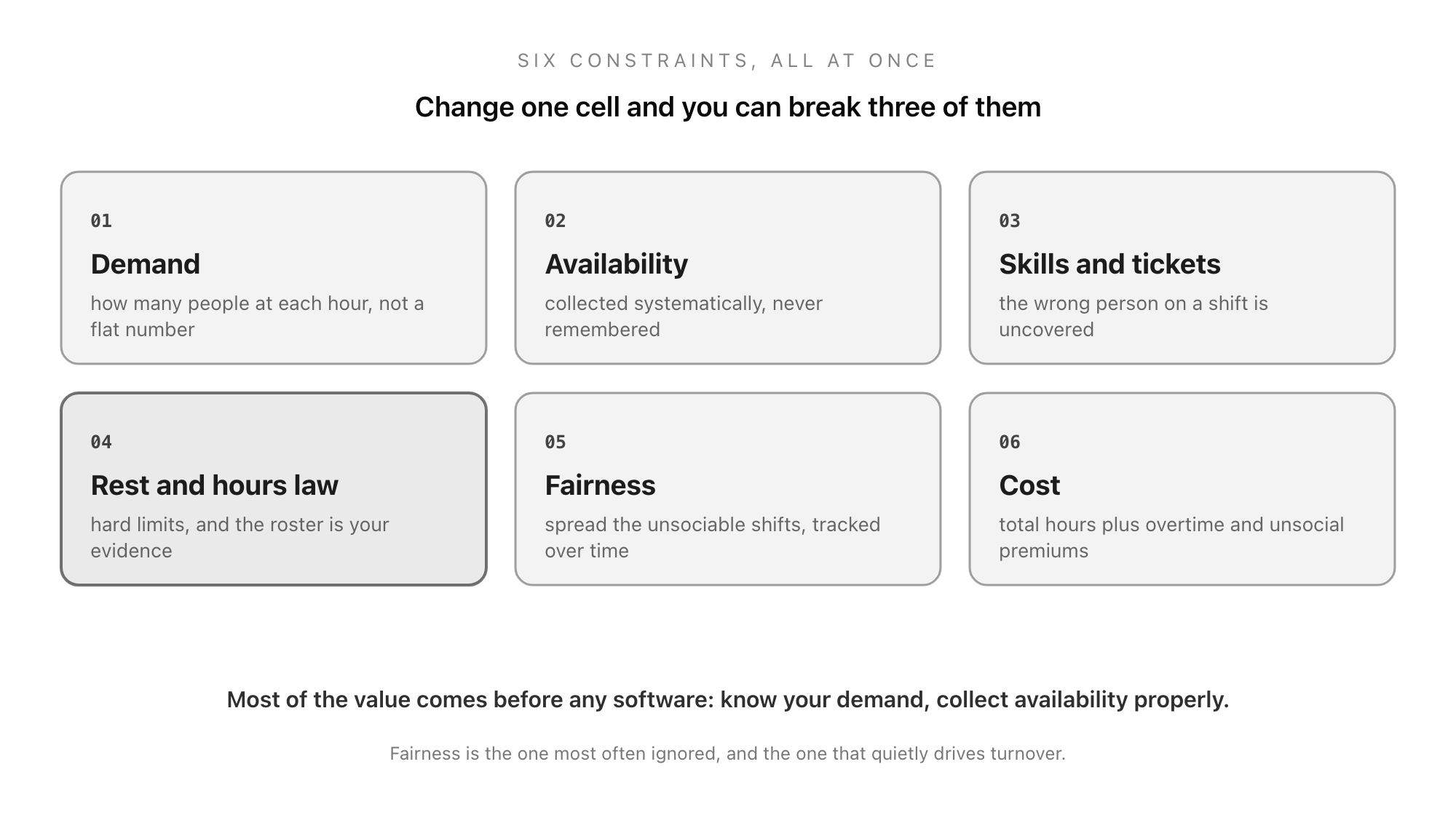
Demand. How many people you actually need at each hour, which varies by day and season. Rostering to a flat number when demand is not flat means being short at peak and overstaffed at quiet times, paying for both mistakes.
Availability. When each person can work, including fixed commitments, study, caring responsibilities, and second jobs. This has to be collected systematically rather than remembered.
Skills and qualifications. Some shifts require a specific certification, licence, keyholder status, or seniority. A shift covered by the wrong person is uncovered, and in regulated settings it is worse than uncovered.
Legal rest and hours rules. Maximum weekly hours, minimum daily and weekly rest, night-work limits, and rules for under-18s all vary by jurisdiction and sometimes by sector. These are hard constraints, not preferences, and the roster is the evidence that you met them.
Fairness. Unsociable shifts, weekends, nights, and holidays should be distributed rather than concentrated on whoever complains least. This is the constraint most often ignored and the one that quietly drives turnover.
Cost. Total hours against budget, plus the premium rates that overtime and unsocial hours attract. A roster can satisfy every other constraint and still be unaffordable.
The reason rostering software exists is that satisfying six constraints simultaneously across twenty people and a month of shifts is genuinely hard. But most of the value comes earlier and cheaper than software: from collecting availability properly and knowing your demand pattern.
Common Rostering Patterns
Fixed shifts. Everyone works the same days and times each week. Simple, predictable, popular with staff, and only workable when demand is stable.
Rotating shifts. People cycle through earlies, lates, and nights so the unpopular slots are shared. Fairer, but harder on sleep, and worth rotating forwards (early to late to night) rather than backwards, which people generally adapt to better.
Four on, four off and similar block patterns. Common in 24-hour operations. Long blocks of work followed by long blocks of rest, which many people prefer, though the shifts themselves are usually 12 hours.
Split shifts. Two separate periods in one day, used where demand has two distinct peaks, such as hospitality. Efficient for the employer and disliked by staff, because the unpaid gap in the middle eats the day.
On-call and standby. Someone available but not working. Check how on-call time is treated for pay and rest purposes in your jurisdiction, because the rules are less obvious than they look.
Self-scheduling. Staff select shifts from the required cover, within rules, and a manager resolves the gaps. It takes more setup and produces markedly better satisfaction, because control over your own schedule is one of the strongest predictors of how people feel about shift work.
How to Build a Roster
1. Establish demand first. Work out how many people, with what skills, at what hours. Do this before looking at any names, or you will end up building the roster around who is available rather than around what the operation needs.
2. Collect availability, on a deadline. Use one form, ask everyone, and set a cut-off. Availability gathered by text, corridor conversation, and memory is the single largest source of rostering error.
3. Place the fixed and constrained items. Approved leave, training, known commitments, and any contractual patterns go in first, because they cannot move.
4. Cover the hardest shifts next. Nights, weekends, and shifts requiring a scarce qualification. Fill the constrained slots while you still have flexibility, not last when you have none.
5. Fill the rest, watching fairness. Track who has had how many unsociable shifts across recent periods, not just this one. Fairness is only visible over time.
6. Check it against every constraint. Rest periods, weekly hours, qualification cover, and total cost. This is the step people skip, and it is where the expensive mistakes are still catchable.
7. Publish it, with as much notice as you can manage. Then keep one authoritative version and communicate changes against it explicitly.
Notice, Swaps, and When It Breaks
Notice matters more than managers usually assume. Late-published rosters make it impossible for people to arrange childcare, study, or a life, and short-notice scheduling is increasingly regulated: several jurisdictions now have predictable-scheduling laws requiring advance notice and sometimes premium pay for late changes. Even where there is no legal duty, notice is one of the cheapest things you can give staff and one of the most valued.
Swaps need a process, not a group chat. A workable rule is that a swap must be agreed between two people, both qualified for the shift, and approved by a manager before it counts, with the roster updated. Swaps agreed informally are the most common way a shift ends up uncovered, because everyone believed somebody else had it.
Absence needs a defined route. Who to tell, by when, and how, and who then finds cover. A named process beats a manager fielding messages on a personal phone, which leaves no record and no cover.
Keep the record. The published roster, its changes, and approved swaps are what let you resolve a "but I wasn't scheduled" dispute months later, and in regulated sectors they may be required.
Common Mistakes
Building it around people instead of demand. Produces a roster that suits the team and fails the operation, or vice versa.
Collecting availability informally. The root cause of most rostering chaos.
Ignoring fairness over time. Nobody objects to one bad weekend. People object to always getting them.
Publishing late. Costs goodwill immediately and, in some jurisdictions, money.
Multiple versions. Two rosters in circulation is worse than none, because everybody is confident and half of them are wrong.
No slack at all. A roster with zero margin breaks the first time someone is ill, which will be this week.
Never reviewing it. Demand patterns shift. A roster built for last year's trade is quietly wrong every single week.
Build Your Rostering Forms in Good Form
The roster itself might live in a spreadsheet or a scheduling tool, but the things that make it accurate are forms, and they are the part usually left informal: collecting availability, requesting leave, and requesting swaps. Get those three into structured forms and most rostering chaos disappears, because you are no longer building a schedule from remembered conversations.
You can build an availability form, a shift swap request, and a leave request in minutes with the free form builder, collecting every response in one place with a timestamp, ready to build the roster from. The same structure supports the records on the other side of the cycle: the attendance register for who actually turned up, the timesheet for hours worked, and the PTO request form for the planned absences that should be in the roster before you start. If you are choosing a tool to run these on, the guide to the best free form builders covers what to look for.
Build your availability form in Good Form →
A roster is a small grid carrying an unreasonable amount of weight: coverage, compliance, cost, and how fairly your team feels treated. The way to make it manageable is not a cleverer spreadsheet but better inputs and a clear order of work: know your demand before you look at names, collect availability on a deadline and in one place, place the immovable things first, fill the hard shifts while you still have room, check it against every constraint before publishing, and give people as much notice as you can. Do that and the roster stops being the job nobody wants and becomes what it should be, a plan that mostly survives contact with the week.