The W-4 form is the federal Employee's Withholding Certificate every US employer must collect from every new hire, and it is the form that decides exactly how much federal income tax comes out of every paycheck for the rest of that employment. The current form is Form W-4 (2026), still built on the 2020 redesign that replaced the old allowances-and-personal-exemptions logic with a five-step layout. It is short, has no math the employee is required to do, and yet roughly one in three new hires fills it in wrong on the first pass, which produces under-withholding surprises at filing season and a small but real audit risk for the employer.
This guide is the section-by-section walkthrough of the W-4 form for a US employer in 2026: what each of the five steps collects, why allowances are gone, how Publication 15-T turns the W-4 into a per-paycheck withholding number, what to do when the IRS sends a lock-in letter, the retention rule that is different from the I-9 retention rule, and the W-4 versus W-9 line that small employers cross when they accidentally treat a contractor like an employee. The audience is HR teams of one to ten, office managers wearing the payroll hat, and operations leads onboarding their first US W-2 employees. If you want a pre-day-one intake that captures Step 1 identity, Step 3 dependent counts, and Step 4 adjustments before your new hire signs the federal form, clone the Good Form W-4 intake template.
The short version:
- Form W-4 has five steps. Only Step 1 (personal info, filing status) and Step 5 (signature) are required. Steps 2, 3, and 4 are only completed if they apply to that employee. A W-4 with just Step 1 and Step 5 is valid; the IRS calls it the "single tax-rate" default.
- Allowances are gone. The 2020 redesign retired the W-4 allowance system because the Tax Cuts and Jobs Act of 2017 eliminated personal exemptions. Any W-4 dated 2019 or earlier still on file uses the old allowance logic; everything from 2020 onward uses the five-step form.
- The form collects four pieces of withholding intent: filing status (Step 1c), multiple-job adjustment (Step 2), annual dependent credit in dollars (Step 3), and other adjustments in dollars (Step 4a other income, 4b deductions, 4c extra withholding per paycheck).
- The employer does not calculate the tax. The employer takes the four inputs above, looks the employee up in IRS Publication 15-T, and applies either the Percentage Method or the Wage Bracket Method. Modern payroll software does this automatically.
- Retain the signed W-4 for at least four years after the due date of the last tax return on which the withholding was based. That is the IRS rule (26 CFR 31.6001-5) and it is longer than the I-9 retention rule, so do not throw the W-4 away when the I-9 binder gets purged.
- A lock-in letter (IRS Letter 2800C) overrides the employee. When the IRS believes the employee has under-withheld, it sends the employer the maximum filing status and withholding the employer must use. The employee has a window to respond; the employer must comply on the date specified.
- W-4 is for employees (W-2). W-9 is for independent contractors and other payees (1099-NEC, 1099-MISC). Collecting the wrong one is the audit signal that the worker is misclassified.
What the W-4 Form Is and Why It Exists
Form W-4, formally the Employee's Withholding Certificate, is the document the employee gives the employer so the employer can withhold the right amount of federal income tax from each paycheck. Withholding is pay-as-you-go taxation: rather than letting the employee owe a single large bill in April, the IRS collects across the year through the employer's payroll system. The W-4 is the employee's instructions for how to do that.
The form has been required since the Current Tax Payment Act of 1943 introduced wage withholding. Its modern five-step structure dates from the 2020 redesign, which was the IRS's response to the Tax Cuts and Jobs Act of 2017 eliminating personal exemptions. The current 2026 edition keeps the same five-step structure with annual inflation-adjusted standard-deduction figures inside the worksheets.
The 2020 Redesign: Why Allowances Are Gone
The pre-2020 W-4 asked the employee to count "allowances." More allowances meant less withholding. The math walked through a personal-allowances worksheet that summed one allowance for the employee, one for a spouse, one per dependent, plus optional allowances for head-of-household status, child tax credit estimates, deductions over the standard deduction, and the two-earner adjustment. The employer then looked up the allowance count against a table.
Allowances were a proxy for personal exemptions. Once the Tax Cuts and Jobs Act zeroed out personal exemptions for 2018 through 2025, the proxy no longer matched the underlying math. The IRS spent 2018 and 2019 publishing transitional W-4s and worksheet patches, then released the redesigned 2020 form, which asks the employee for the inputs directly: filing status, expected annual dependent credit in dollars, expected other income in dollars, expected deductions over the standard deduction in dollars, and any extra withholding in dollars per paycheck.
The effect for the employer is that any W-4 dated 2019 or earlier still on file uses allowance math, and any W-4 dated 2020 or later uses the five-step math. Payroll software handles both formats. The employer does not need to ask employees to refile, but should request a new W-4 from any employee whose pre-2020 form produces obviously wrong withholding.
Step 1: Personal Information and Filing Status
Step 1 has three boxes: 1a (name and address), 1b (social security number), and 1c (filing status). Filing status has three options on the W-4: Single or Married filing separately, Married filing jointly or Qualifying surviving spouse, and Head of household.
Step 1 is the only required step besides the signature. An employee who completes only Step 1 and Step 5 is treated as if their tax situation is the simplest case for the chosen filing status: no other jobs, no dependent credits, no other adjustments. The standard deduction for that filing status is built into the withholding tables, so the employee does not enter it anywhere.
Two practical notes on filing status. First, the W-4 filing status does not have to match the actual tax-return filing status; it is an instruction to the employer about how much to withhold. A married couple where one spouse has a much higher salary often chooses Single on both W-4s to compensate for the rate-stack effect. Second, Qualifying surviving spouse is bundled with Married filing jointly on the W-4 even though they are separate categories on Form 1040; the withholding tables treat them identically for two years after a spouse's death.
Step 2: Multiple Jobs or Spouse Works
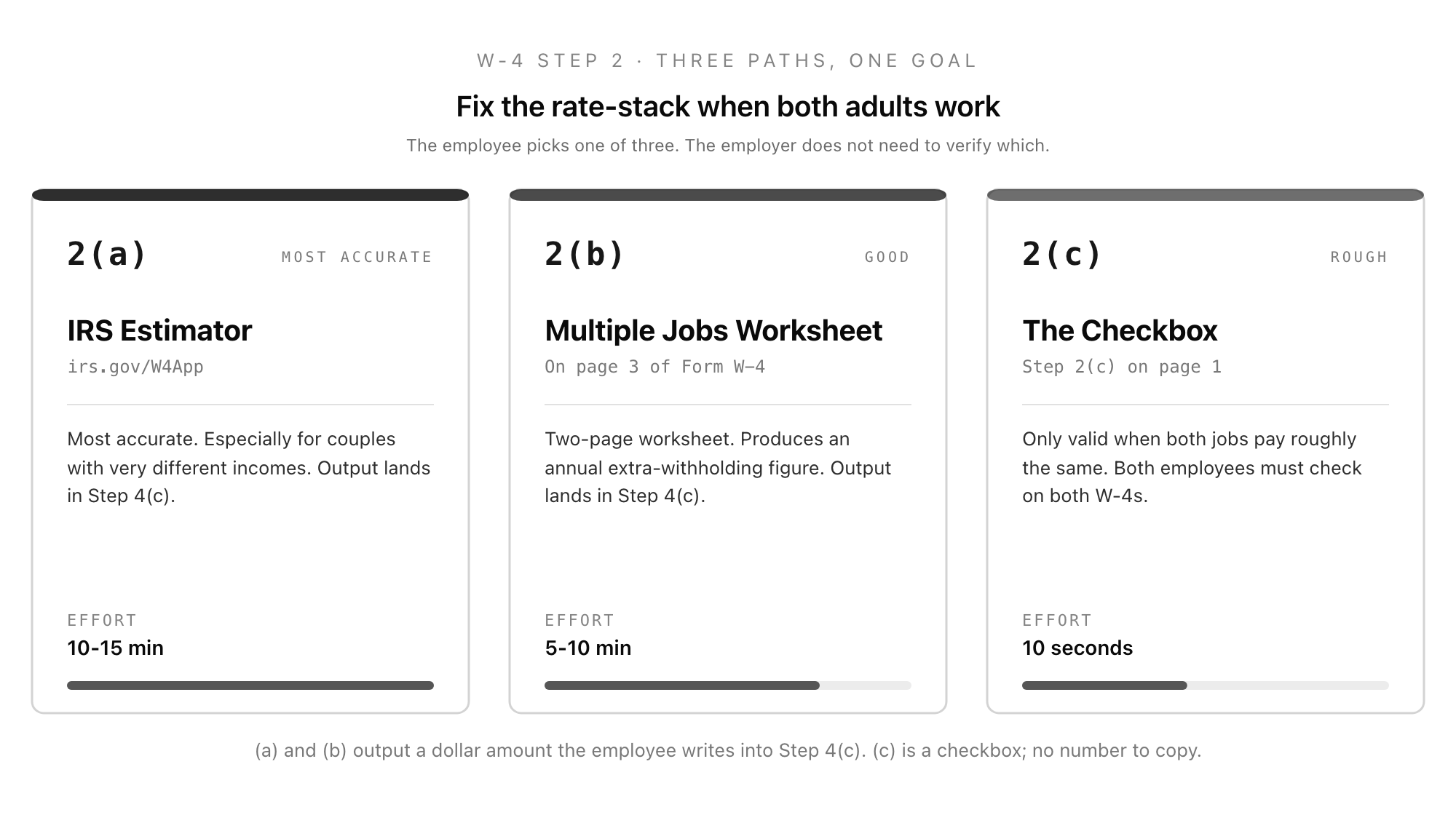
Step 2 is the redesign's single most-misunderstood feature. It exists because the per-paycheck withholding tables assume one job at a time. If the employee has a second job, or a spouse who works (and Step 1c is Married filing jointly), withholding from each individual paycheck will be too low because each job's payroll system applies the standard deduction and the lower brackets in full.
The W-4 gives the employee three ways to correct for this:
- 2(a) IRS estimator. Use the Tax Withholding Estimator at irs.gov/W4App. The estimator outputs values to write into Step 4(c) extra withholding. This is the most accurate option, especially for couples with very different incomes.
- 2(b) Multiple Jobs Worksheet. A two-page worksheet on page 3 of Form W-4 that produces an annual extra-withholding amount. The employee enters the result on Step 4(c).
- 2(c) The checkbox. Only valid when the employee has exactly two jobs total, or when both spouses work and have only one job each, and both jobs pay roughly the same. Both employees must check the box on both W-4s for the math to land. The checkbox triggers a different column in Publication 15-T that increases withholding by approximately the right amount.
The employee should choose only one of 2(a), 2(b), or 2(c). The employer does not need to verify which; the employer applies whichever signal arrived on the form.
Step 3: Claim Dependents
Step 3 is where the employee converts the Child Tax Credit and the Credit for Other Dependents into a withholding reduction. The W-4 instructs the employee to multiply qualifying children under age 17 by $2,000, multiply other dependents by $500, and add the results. The total is annual, in dollars, and the employer divides it across pay periods to reduce per-paycheck withholding.
Two narrow cases that come up. A new hire mid-year who already had the full year's dependent benefit applied through a previous employer should typically leave Step 3 at zero on the new W-4 (the previous job's W-2 already absorbed the credit). A high-earner phase-out can apply once household adjusted gross income crosses the threshold; the W-4 does not handle this automatically, but the IRS estimator does, which is the reason high-earner couples are pushed to use the estimator.
Step 3 is also where the W-4 quietly admits the employee is a US citizen or resident alien, because non-resident aliens have a separate W-4 protocol (see IRS Notice 1392) and must not use Step 3 in the standard way.
Step 4: Other Adjustments
Step 4 has three boxes that the employee fills in only if applicable.
- 4(a) Other income. Annual dollar amount of expected non-job income the employee wants withheld against: interest, dividends, retirement distributions, side gig income. Increasing 4(a) increases per-paycheck withholding.
- 4(b) Deductions. Annual dollar amount of expected itemized deductions, plus above-the-line deductions, in excess of the standard deduction. The Deductions Worksheet on page 3 walks through this. Used by employees who itemize. Increasing 4(b) decreases per-paycheck withholding.
- 4(c) Extra withholding. A flat per-paycheck dollar amount to add on top of whatever the withholding tables produce. The most common destination for output from the Tax Withholding Estimator and the Multiple Jobs Worksheet. Useful for fixing under-withholding fast.
Step 4 is the lever the employee uses to tune withholding without changing filing status or dependent claims. An employee who got a surprise bill last April typically asks payroll to bump 4(c) by enough to cover the gap over the remaining pay periods.
Step 5: Sign and Date
The employee signs and dates the form. An unsigned W-4 is treated as if it was never filed; the employer must withhold at the default Single rate with no adjustments until a signed form arrives. A typed signature is acceptable for electronically captured W-4s under IRS guidance, provided the system records the date and the employee's authentication.
Below Step 5 sits the employer-only section: legal employer name and address, first date of employment (used by some state new-hire-reporting programs), and the federal Employer Identification Number. The employer completes this on receipt.
How Withholding Actually Gets Calculated
The employer does not look up "withhold $X per paycheck" from a single table. The employer takes five inputs from the W-4 (filing status, the Step 2(c) checkbox state, the Step 3 dependent credit, the 4(a) other income, the 4(b) deductions, the 4(c) extra withholding), takes the employee's gross wages for the period, and runs the calculation in IRS Publication 15-T using one of two methods.
The Percentage Method applies the brackets directly to annualized wages. The Wage Bracket Method uses precomputed lookup tables for common pay frequencies. Both methods arrive at the same answer (within rounding). The Wage Bracket Method exists for employers without payroll software; in practice, every modern payroll product uses the Percentage Method internally. The annual standard deduction for the chosen filing status is built into the tables, which is why the employee never enters it on the W-4.
Publication 15-T is reissued annually with bracket and standard-deduction inflation adjustments. The 2026 edition is the relevant document for 2026 paychecks. Payroll software vendors update the tables on the IRS release date.
Lock-In Letters: When the IRS Overrides the Employee
If the IRS believes an employee is consistently under-withholding by claiming a filing status or dependent count that produces a result inconsistent with their tax return, it sends the employer IRS Letter 2800C, known as a lock-in letter. The lock-in letter specifies the maximum filing status and the minimum withholding the employer must apply from the date specified on the letter.
The employer's obligations are narrow and rigid:
- Notify the employee in writing within ten business days of receipt, providing a copy of the lock-in letter and IRS Publication 1494.
- Allow the employee 60 days to respond directly to the IRS with a corrected W-4 or supporting documentation. The employee does not respond to the employer; the employer is only the messenger.
- Apply the lock-in withholding on the effective date in the letter, regardless of whether the employee submits a new W-4 to the employer in the meantime.
- Continue applying the lock-in withholding until the IRS sends a release letter (Letter 2808C). A new W-4 from the employee that asks for less withholding than the lock-in level is invalid until release; a new W-4 asking for more withholding is valid.
Lock-in letters are uncommon. They show up most often after multi-year under-withholding patterns or after the IRS catches an employee filing exempt who is not exempt. When they arrive, the employer's job is to follow the four steps above, file the letter with the rest of the employee's payroll records, and avoid going to the employee for tax advice. Direct the employee to the IRS contact information on the letter.
Retention and Re-Submission Rules
The IRS rule under 26 CFR 31.6001-5 requires employers to retain Form W-4 for four years after the due date of the last quarterly tax return (Form 941) on which the withholding from that W-4 was reported. The practical effect for a new hire who joins in 2026 and stays through 2028 is that the W-4 from their first day must be retained until at least April 2033, and possibly longer if they make adjustments along the way.
This is longer than the I-9 retention rule, which is the longer of three years from hire or one year from termination. Small employers running an annual document purge sometimes treat the I-9 and the W-4 as a single packet and shred both when the I-9 ages out; the W-4 should stay. The fix is to keep the W-4 binder (or its digital equivalent) on a separate retention clock from the I-9 binder.
A W-4 stays in effect until the employee files a new one. There is no annual refile requirement. The exception is employees claiming exempt status (no withholding because they had no tax liability the prior year and expect none in the current year); exempt W-4s expire on 15 February of the following year and must be refiled, or the employer must default to Single with no adjustments.
W-4 vs W-9: The Independent-Contractor Difference
The W-4 is for employees. An employee is a W-2 worker: the employer withholds income tax, withholds and pays the employee share of Social Security and Medicare, pays the employer share, and remits all of it to the IRS through Form 941.
The W-9 is the IRS form an independent contractor (or other payee, including landlords, freelancers, and vendors) gives the payer so the payer can issue a year-end Form 1099-NEC or 1099-MISC. There is no withholding; the contractor pays self-employment tax themselves. The W-9 collects the Taxpayer Identification Number and a certification of US person status.
The line that small employers cross is when they treat a worker as a contractor (W-9, 1099) who is legally an employee (W-4, W-2). The IRS uses a three-factor test (behavioural control, financial control, relationship) borrowed from common law. The audit consequence of misclassification is back payroll taxes, interest, and penalties; the lawsuit consequence is back wages and benefits. If a worker shows up wanting to fill out a W-4 and you have already issued them a W-9, treat that as a flag to revisit the classification with an employment lawyer, not as an administrative inconsistency.
How Good Form Fits Around the W-4
The W-4 itself is a federal form. You cannot replace it, you cannot rebuild it, and the IRS expects the signed version (paper or compliant electronic) for your retention file. What you can do is collect the underlying information cleanly before the new hire sits down with the form, so the W-4 they sign on day one is correct and you do not have to chase corrections after the first paycheck.
Good Form is a form builder used by recruiters and HR teams to run the intake side of employment paperwork: application forms, interview feedback, employee onboarding, offer letters, and the new-hire paperwork packet. For a federal form like the W-4 or the I-9, Good Form lives one step upstream: it captures Step 1 identity, Step 3 dependent counts, and Step 4 adjustments before day one, so HR can either pre-fill the federal form or sit down with the employee with the numbers already known.
The Companion Template
The Good Form W-4 intake template (clone it here) is a pre-day-one capture for the four W-4 inputs the employee will need to know before they sign. It asks for legal name, address, and social security number (Step 1a and 1b), expected filing status (Step 1c), the multiple-jobs path the employee plans to take (Step 2a estimator, 2b worksheet, or 2c checkbox), the dependent count by category (Step 3), and the four-part Step 4 adjustment intent.
It does not replace Form W-4. It is the intake that surfaces the questions while there is time to answer them properly, so day one is a short signature instead of an hour of pulling tax returns out of the email archive. The employee still completes and signs the official 2026 Form W-4. You retain that signed federal form for four years; the intake form is just the working draft.
Form W-4 is the smallest piece of federal paperwork that has the largest per-paycheck consequence. Treat it the same way you treat the I-9: the document itself is short, the surrounding process is what produces accuracy.